Make itMOVE.
A moving filter.
A deliberate accent.
A bassline with a point of view.
Perform turns a bass pattern into an instrument you can play. Choose a voice, shape its articulation and find the right amount of drive and space. Then capture the movement that makes the line belong in your track.
For musicians and producers / CreakBox V2.1.0001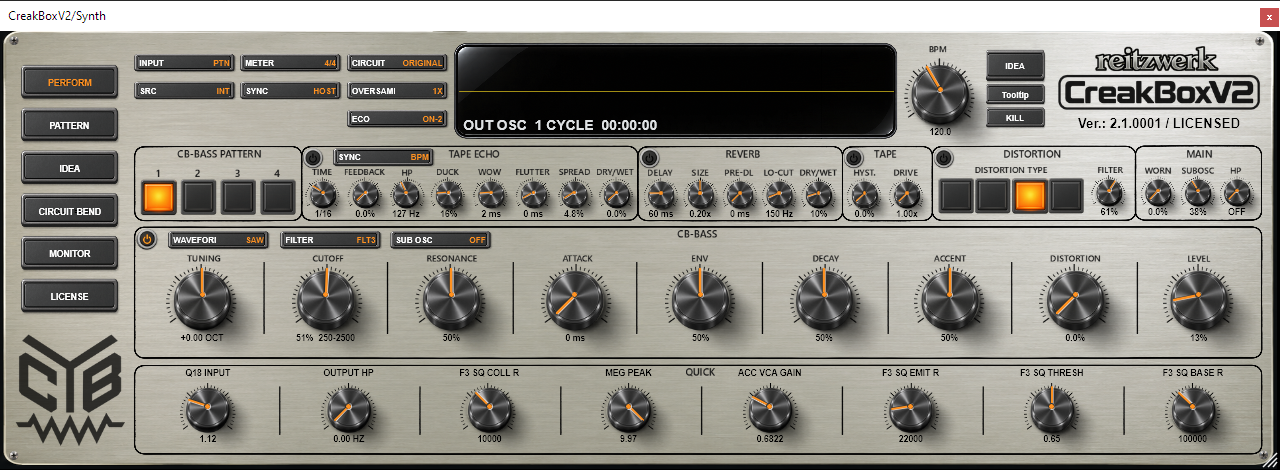
Start with the music. Then shape the machine.
Put CreakBox on an instrument track and loop a useful stretch of your arrangement. A kick and a little percussion are enough. Select INPUT: PTN, SRC: INT and SYNC: HOST, then start the DAW. These three choices mean: play the stored pattern, use the internal synth, and follow the host clock.
Check the CB-BASS power switch beside WAVEFORM and bring LEVEL to a comfortable working level. New patterns contain sixteen plain C2 notes, so you can hear a repeated bass immediately. Write a phrase on PATTERN, or find a starting point with IDEA, then return here to work on its sound.
For a first listening pass, keep distortion, tape, echo and reverb off. Choose SAW, use moderate Resonance, and move Cutoff while the phrase loops. Add ENV until each note has a useful opening gesture; use Decay to decide how long that gesture speaks. Bring in Accent and Slide after the basic groove works.
Keep the kick in the conversation.
Judge the bass with the rhythm section playing. If the low end becomes crowded, shorten the phrase, reduce sub level or trim the lowest frequencies before adding more processing. A spectacular solo sound can take too much room in a record.
Match level before choosing a favourite.
Different filter families and distortion types can change level as well as tone. Use the DAW’s output trim for a fair comparison. CreakBox’s LEVEL is part of the modeled gain structure, so changing it can also change how hard later stages are driven.
Choose the player, the source and the clock.
The controls across the top also appear on Pattern. They decide what is playing and how it stays in time. INPUT, SRC and SYNC answer different questions; selecting MIDI does not select an external audio input, and selecting EXT does not import audio into the pattern grid.
| Control | How to use it musically |
|---|---|
| INPUT: PTN / MIDI / IDEA | PTN plays the internal pattern bank. MIDI lets incoming notes control pitch and gate directly. The current authored selector also cycles into IDEA audition, carrying the selected idea into Perform; returning to PTN leaves that test route. IDEA is a working audition, so use USE IDEA to commit a chosen result. |
| SRC: INT / EXT | INT supplies the internal oscillator. EXT processes audio arriving at the plug-in’s External Sidechain In bus. The DAW must activate and feed that bus; an instrument track’s ordinary MIDI input does not supply external audio. Pattern/MIDI control can still provide articulation for the external signal. |
| SYNC: HOST / FREE | HOST follows DAW play state, tempo and musical position. FREE uses CreakBox’s own clock. With the editor focused, Space starts/stops the free clock. FREE here describes clock sync, independently of whether the product is licensed. |
| BPM | Sets the internal tempo in FREE sync. In HOST sync the DAW remains authoritative: turning this knob is not a way to change your project tempo. Echo’s BPM timing follows the effective Host/Free tempo. |
| METER | The straight 4/4 setting gives four steps per quarter note; Triplet gives three. It changes step spacing and gate timing, not the DAW’s time signature. Sixteen straight steps fill four quarter notes; twelve triplet steps fill the same duration. |
| CIRCUIT | Selects Original CBBASS or a saved machine configuration when Circuit access is licensed. A configuration changes sound/circuit settings and its associated setup; it is separate from a four-pattern bank. Explicit Original selection preserves your pattern bank and instance quality settings. See the startup-default explanation below. |
| OVERSAM | Sets the live global oversampling choice: 1X, 2X, 4X, 8X or 16X when licensed. Higher factors cost CPU. This is a quality decision, not a tempo or pitch control; quality and rendering explains the important exceptions. |
| ECO | Chooses OFF, ON-1, ON-2 or ON-3 for live CPU/character tradeoffs. The faster modes can change timbre; they are not just display preferences. Settle your final sound at the quality you intend to use. |
The display and the three action buttons
OUT OSC shows a normalized output cycle, including the effect of the current sound path. It is useful for seeing shape, not judging absolute output level. A horizontal centre line can mean silence, DC or an incomplete/non-oscillating cycle. After a waveform/sub change, the temporary blue RAW view shows the source before filtering, then the display returns to the live output. MONITOR provides a larger waveform/spectrum view.
The upper IDEA button opens the IDEA workspace. While Lock Mode is active it becomes red LOCK; clicking it leaves Lock Mode. Tooltip toggles hover help. KILL sends a one-shot panic for sounding voices and effect tails without erasing notes, changing knobs or stopping the DAW. Playback can generate new notes afterwards; KILL is not a transport stop or a momentum-stop button.
The version/licence caption identifies the running build and entitlement. The left-hand page buttons take you to Perform, Pattern, IDEA, Circuit Bend, Monitor and License. Circuit Bend requires licensed Circuit access; the ordinary sound and pattern pages remain available in the Full product’s free edition.
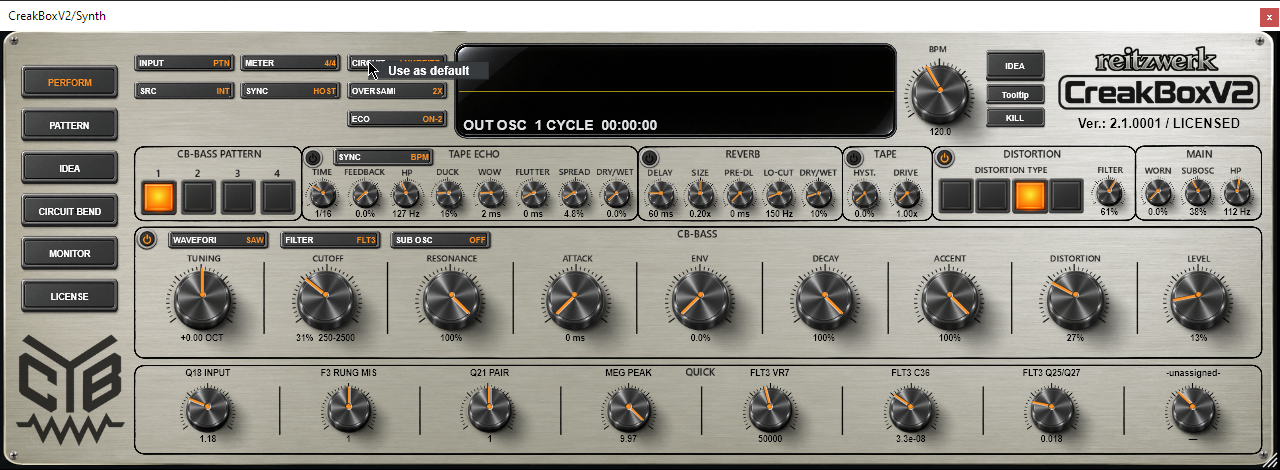
Make your preferred circuit the starting point
With an active licence, select the desired circuit, then right-click CIRCUIT → Use as default. This remembers it for new Full-product instances. It does not overwrite existing instances or saved projects. Choose Original CBBASS and repeat the command to restore Original as the startup circuit. The default-mark icon identifies the effective startup choice.
A sequenced bassline, a MIDI instrument or an audio processor.
| Musical job | Setup and behaviour |
|---|---|
| Internal sequence | PTN + INT + HOST: program the four slots on Pattern and let the DAW run them. Use the numbered pattern buttons or 1–4 to choose a slot. A steady lamp marks the playing pattern; a queued request can blink while waiting for a boundary. |
| Notes from your DAW | MIDI + INT: draw a monophonic phrase in the DAW or play a keyboard. Notes are bounded to C1–C5 in CreakBox’s convention. Leave small gaps for fresh gate articulations; overlap notes for legato slides when MIDI Legato Slide is enabled. |
| External audio | EXT: route a loop, another synth or an audio track into External Sidechain In using your DAW’s routing. Use Cutoff, Resonance, distortion and effects to reshape it. The note-control route can articulate/filter it, but Tuning and the internal waveform/sub controls do not transpose or replace the external recording. |
MIDI accents are part of the performance
MIDI velocity at or above the MIDI accent threshold selects an accented articulation; the stock threshold is 100 on the 1–127 scale. Velocity here is a normal/accent decision rather than a piano-like continuous loudness curve. The ACCENT knob and the circuit determine how strong that contrast sounds. The threshold and MIDI Legato Slide are available as exposed settings in the host; a saved project can retain different values.
CreakBox uses last-note priority. If you overlap notes and release the newest while an older one remains held, it returns to the most recently held remaining note. For a clean, separate attack, leave a real gap between notes. Pattern ATTACK flags are a separate feature and do not soften ordinary MIDI notes.
Use your DAW to build the arrangement
In PTN input, MIDI notes 24–27 select P1–P4: C1, C♯1, D1 and D♯1 in CreakBox’s naming. Those notes are pattern-selection commands, not bass pitches, and their note-offs do not stop the pattern. Place short trigger notes at the intended starts of sections and keep the host transport running. Different DAWs label octaves differently, so the MIDI numbers are the reliable reference.
In MIDI input, those same notes are played as musical pitches. Choose your arrangement method deliberately: internal patterns selected from the DAW, or a phrase written as ordinary MIDI notes. The Pattern manual covers the first approach in more detail.
Make the note speak before you add more notes.
| Control | How to use it musically |
|---|---|
| CB-BASS power | Mutes the voice audio without stopping the pattern clock. Existing echo/reverb tails can continue, making it useful for drops that leave the space hanging. Switch the effects off or use KILL when you actually want their tail cleared. |
| WAVEFORM | SAW gives a dense harmonic source for bright sweeps. SQR emphasizes a different, often hollow character. These modeled squares are not perfect 50% digital pulses: their duty and curvature change with the voice family, register and configuration. Listen again after a filter-model change. |
| FILTER | Selects FLT1–FLT4. The selection also chooses the associated oscillator/voice family, so the difference starts before the filter. Stored pattern notes and the shared logarithmic Cutoff position remain stable; the resulting timbre, level and resonance can change. |
| TUNING | Transposes the live pitch-control path while keeping stored pattern notes intact. The display uses octaves. Use it to place the whole instrument in the track; use Pattern transpose when you want the saved notes themselves changed. |
| CUTOFF | Sets the base opening of the low-pass response. Low positions leave a darker foundation; higher positions reveal more harmonics. Its travel is logarithmic and follows the selected circuit’s panel range. The percentage readout is knob travel, not “percentage of audible frequencies.” ENV and Accent can move the filter above its resting position. |
| RESONANCE | Concentrates the response around the resonant region and lengthens its ring. It can reduce body while increasing the prominence of a narrow feature. At high settings some models self-oscillate. Judge the low end and the peak together instead of compensating with a large gain boost. |
| ENV | Sets filter-envelope modulation depth. More ENV gives a larger bright-to-dark gesture. It needs some cutoff headroom to be audible: a very open base Cutoff can leave less of the sweep in the useful range. The audio-tapered travel gives detailed control at the lower end. |
| DECAY | Sets the normal filter-envelope fall time. Shorter values make tight plucks; longer values let a gesture spill across the rhythm. It is not the duration of every note’s volume gate. Accented notes also interact with their own modeled envelope/control paths, so one Decay value does not promise identical tails on every step. |
| ACCENT | Sets accent strength in the filter and VCA paths. First place Accent flags on Pattern, or send accented MIDI velocities; then use this knob to set the contrast. At high resonance an accent can change the shape of the phrase, not merely make a note louder. |
| ATTACK | Sets the separate filter-modulation opening slew on Attack-marked internal pattern notes. At 0 ms it is bypassed. Every marked note restarts it, including repeated loops and marked Slide destinations. It is not a VCA fade. With a long setting and many flags, repeated restarts can keep the sweep subdued; use fewer flags or a shorter time. |
| DISTORTION | Sets the amount for the selected DIST1–DIST4 path. Changing the amount above zero enables distortion; returning it to zero switches it off. You can bypass with the distortion section’s power control while retaining a non-zero amount, but another amount edit can enable it again. |
| LEVEL | Changes the modeled bass-volume wiper before later output/distortion processing. More level can add output-stage crunch, especially on accented notes. It is part of the sound, not a guaranteed transparent final trim; use your DAW’s gain control when you need a neutral comparison. |
A useful order for a filter phrase
Set Cutoff for the darker part of the line. Add enough ENV to open the accented shape you want, then set Decay against the step spacing. Raise Resonance until the phrase speaks clearly without losing the bass role. Finally adjust Accent while listening to the marked notes. This gives each control a musical job and keeps you from chasing a brighter sound with four knobs at once.
Choose the character that answers the track.
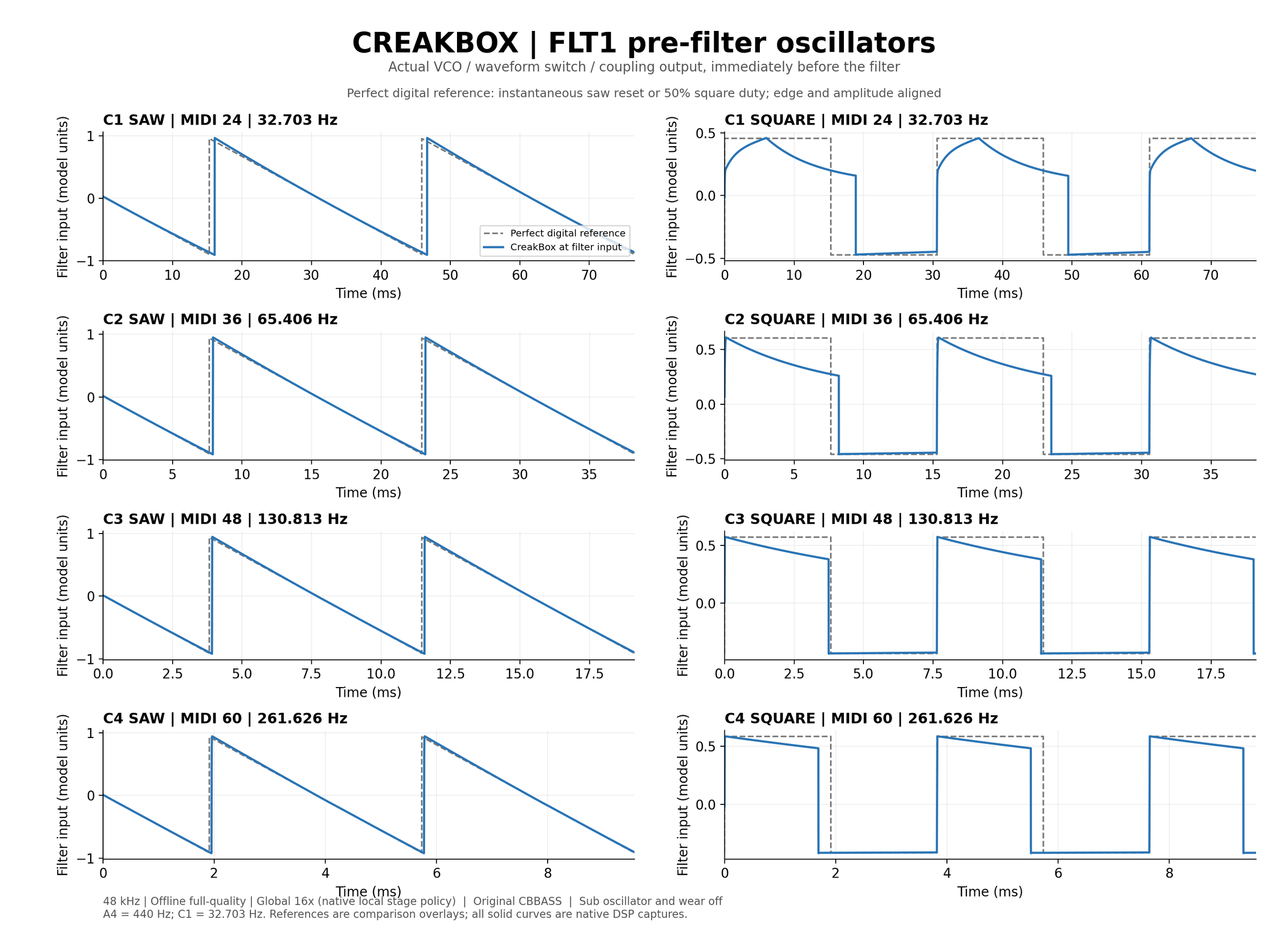
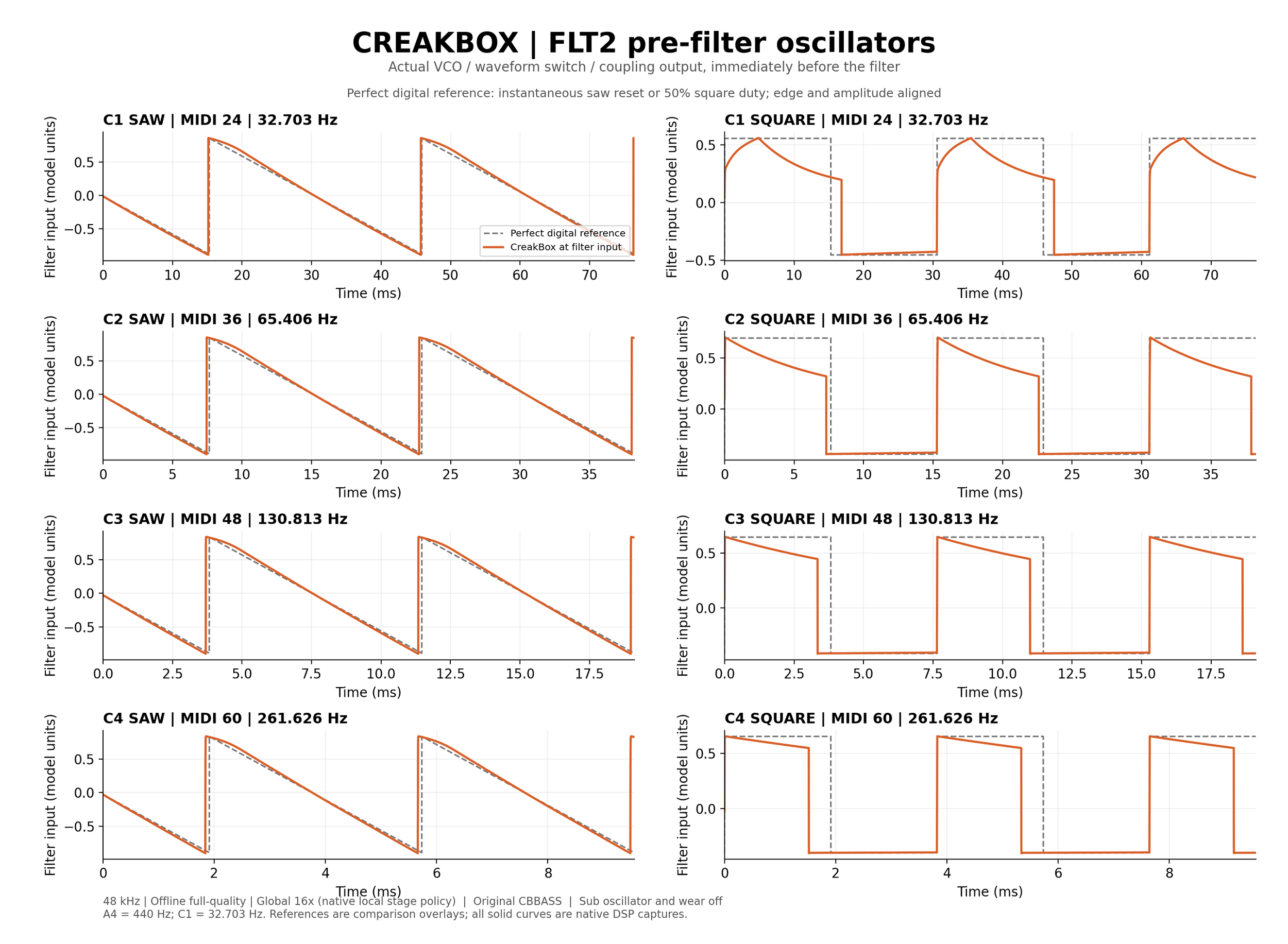
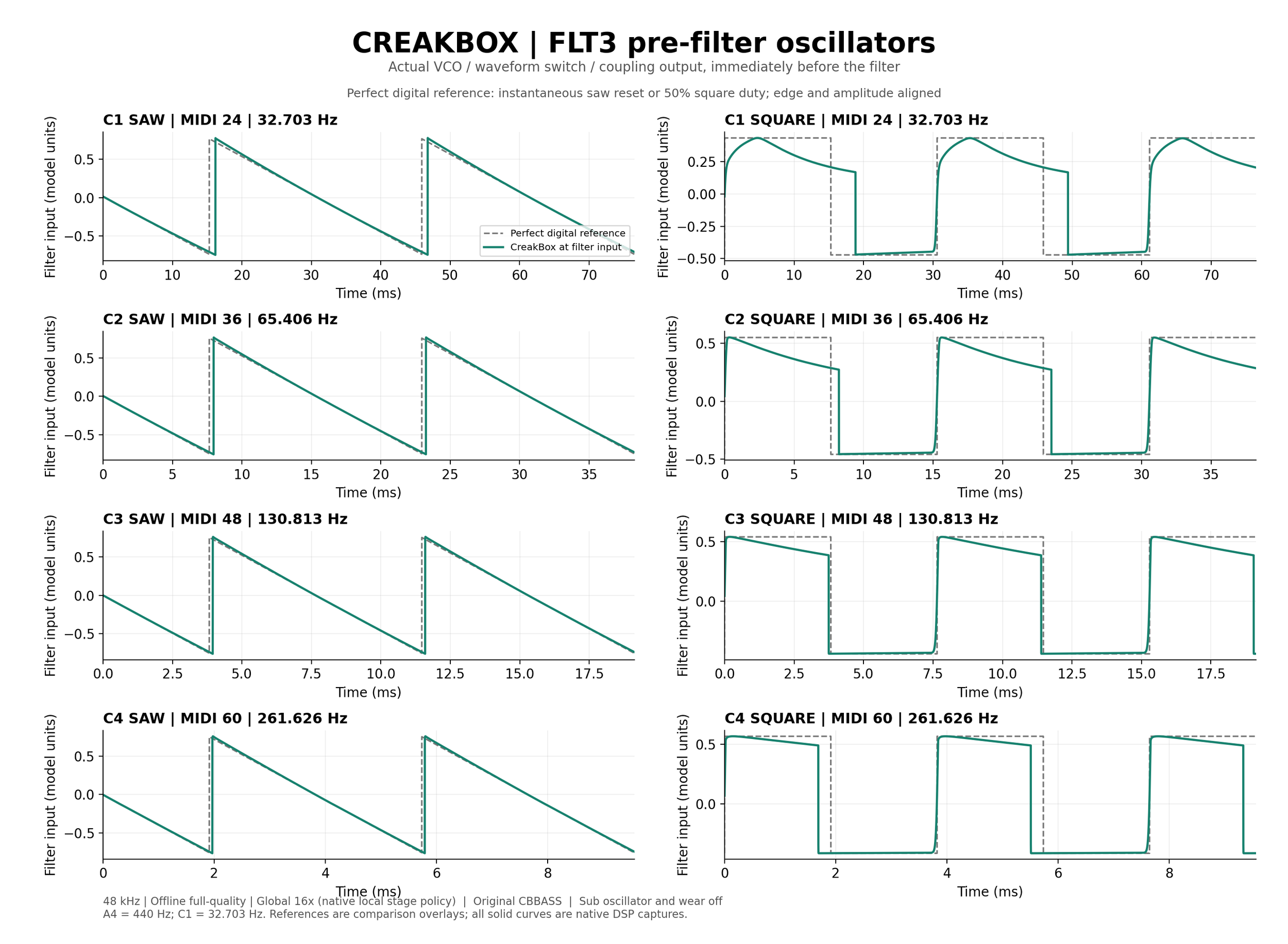
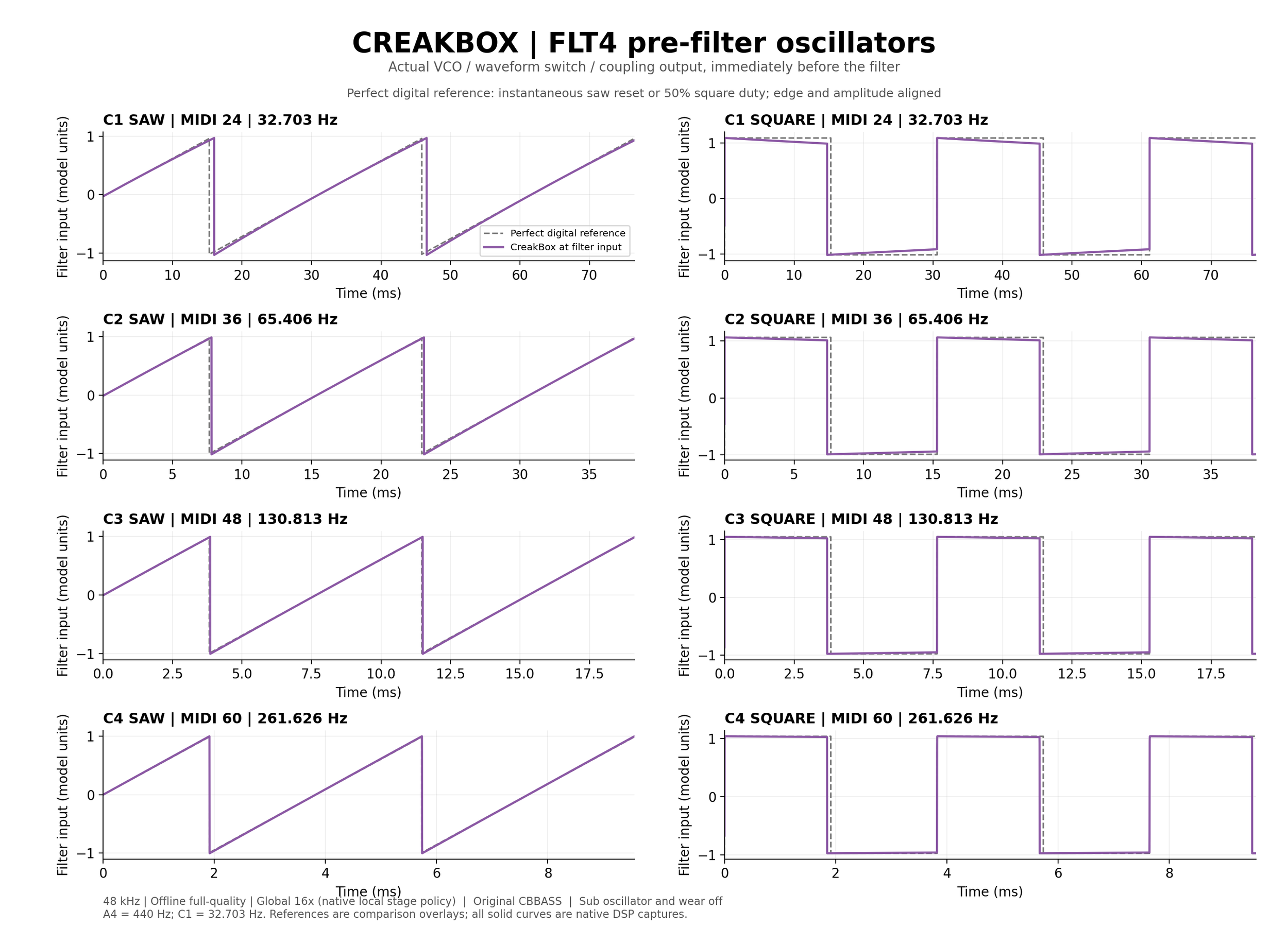
A filter choice in CreakBox is a voice-family choice. Keep a pattern running, match perceived level and compare the same SAW/SQR choice before deciding which one belongs in the track. The source diagrams below make the differences visible from C1 to C4.
The dashed digital references in the oscillator diagrams are saw and square, aligned for phase/level comparison. The solid traces are captured before the filter. The different axis levels and capture quality are documented on the figures; they are not output loudness rankings.
FLT1 / A flexible acid starting point.
A nonlinear, four-stage ladder path paired with the standard oscillator family. Use it for direct acid articulation and a relatively economical starting voice. Its audio-resonance response is calibrated towards the selected Original FLT3 reference, while its independent Accent behaviour is retained. It remains its own model.
See the FLT1 oscillator shapes, C1–C4
FLT2 / A more exposed, aggressive resonance.
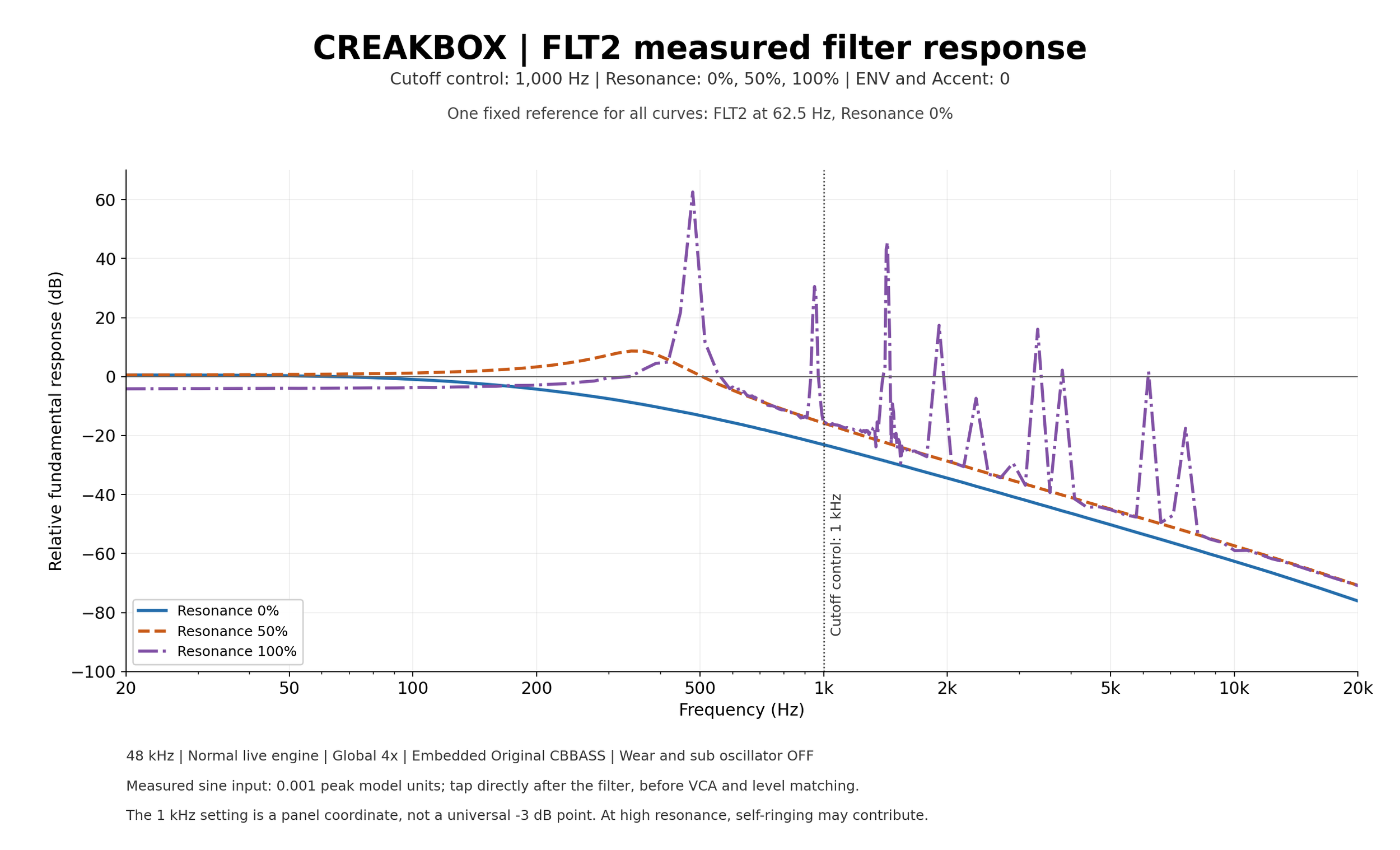
A two-pole nonlinear low-pass with a feedback path that can become strongly self-oscillating near the top of Resonance. Try it when you want the resonant voice to push forward or when a less steep basic low-pass shape suits the phrase. Leave headroom before exploring the last part of the knob.
See the FLT2 oscillator shapes, C1–C4
FLT3 / Detailed acid articulation.
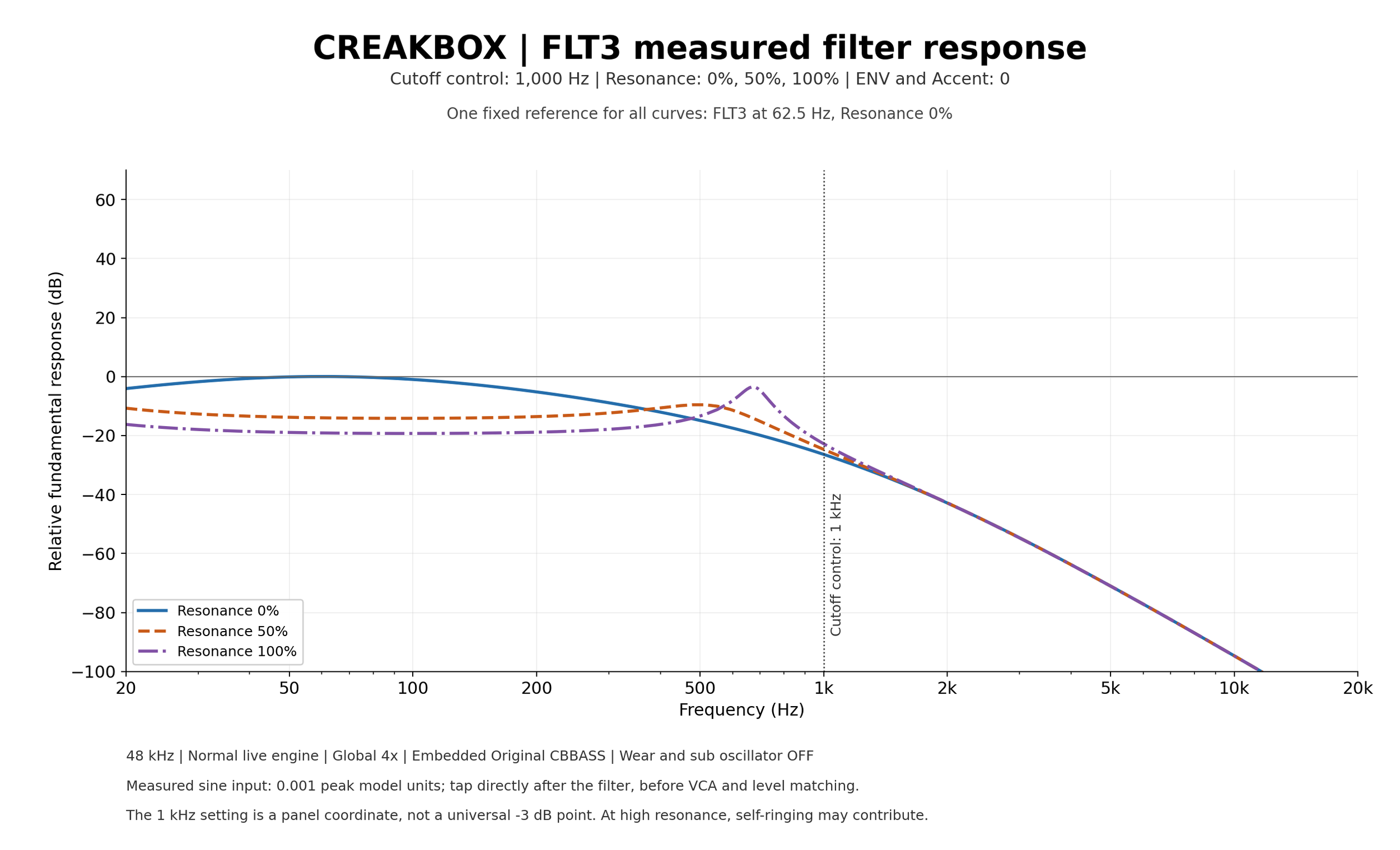
The detailed component-level circuit model combines its own oscillator, nonlinear filter and physical accent/VCA relationships. It is useful when small interactions between pitch, envelope, accent and resonance are the centre of the sound. It can cost more CPU than a simpler voice, particularly at high global quality.
See the FLT3 oscillator shapes, C1–C4
FLT4 / A different foundation under the filter.
A triangle-core oscillator architecture supplies the selectable SAW/SQR sources and clock-divided sub, followed by a four-pole filter and its output-VCA path. Try it for a firm bass foundation and for a different relationship between square, sub and resonance. The high-resonance end can ring strongly.
See the FLT4 oscillator shapes, C1–C4
Resonance changes the balance, not just the brightness.
These graphs were measured from the current native CreakBox code using the embedded Original configuration. Cutoff is held at the 1,000 Hz control coordinate; ENV, Accent and Worn are zero, the sub is off, and the Normal live engine runs at 48 kHz with global 4× processing. A small sine is measured immediately after the filter, before VCA and model-to-model level compensation.
Each model uses its own fixed 62.5 Hz / Resonance 0% reference. Keeping that same reference for all three curves shows both a resonant peak and any loss of low-frequency body. The panels do not compare the final loudness of the four instruments. The dotted 1 kHz line marks the control setting; these circuits do not share a universal −3 dB cutoff at that line.
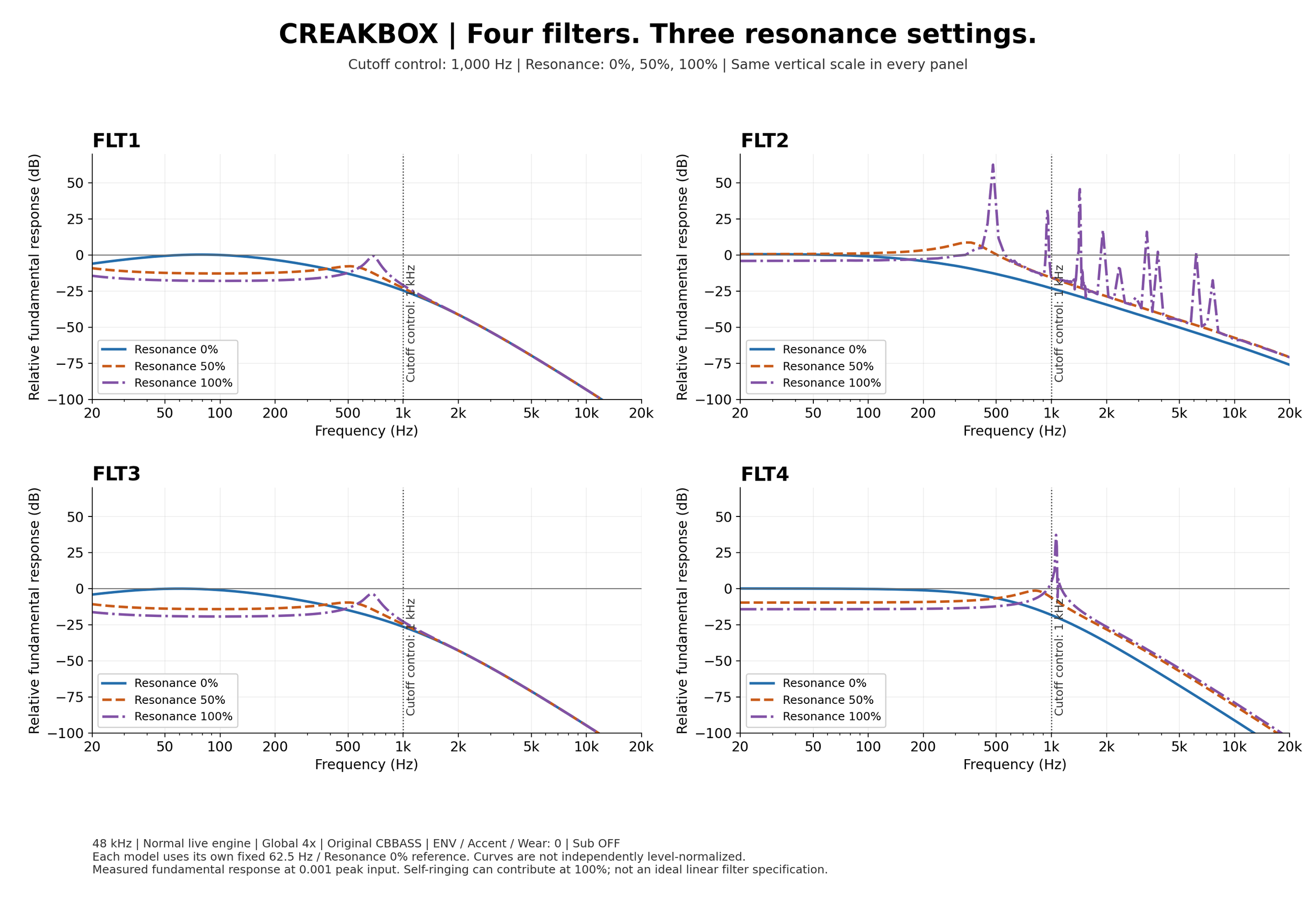
Musically, notice how the resonant region becomes more prominent while the body can fall back. A setting that feels smaller on a sustained note may sound much more animated when the filter envelope moves it. At 100% on a self-oscillating model, the circuit contributes its own tone; that is a different role from simply emphasizing the oscillator.
With the approximately 250–2,500 Hz Original Cutoff range, the 1,000 Hz coordinate is about 60.2% logarithmic travel. Different circuit ranges, modulation, input levels and quality choices can move the audible result. For an actual bassline, make the final judgement with its notes and envelopes running.
Open the detailed FLT1 response graph
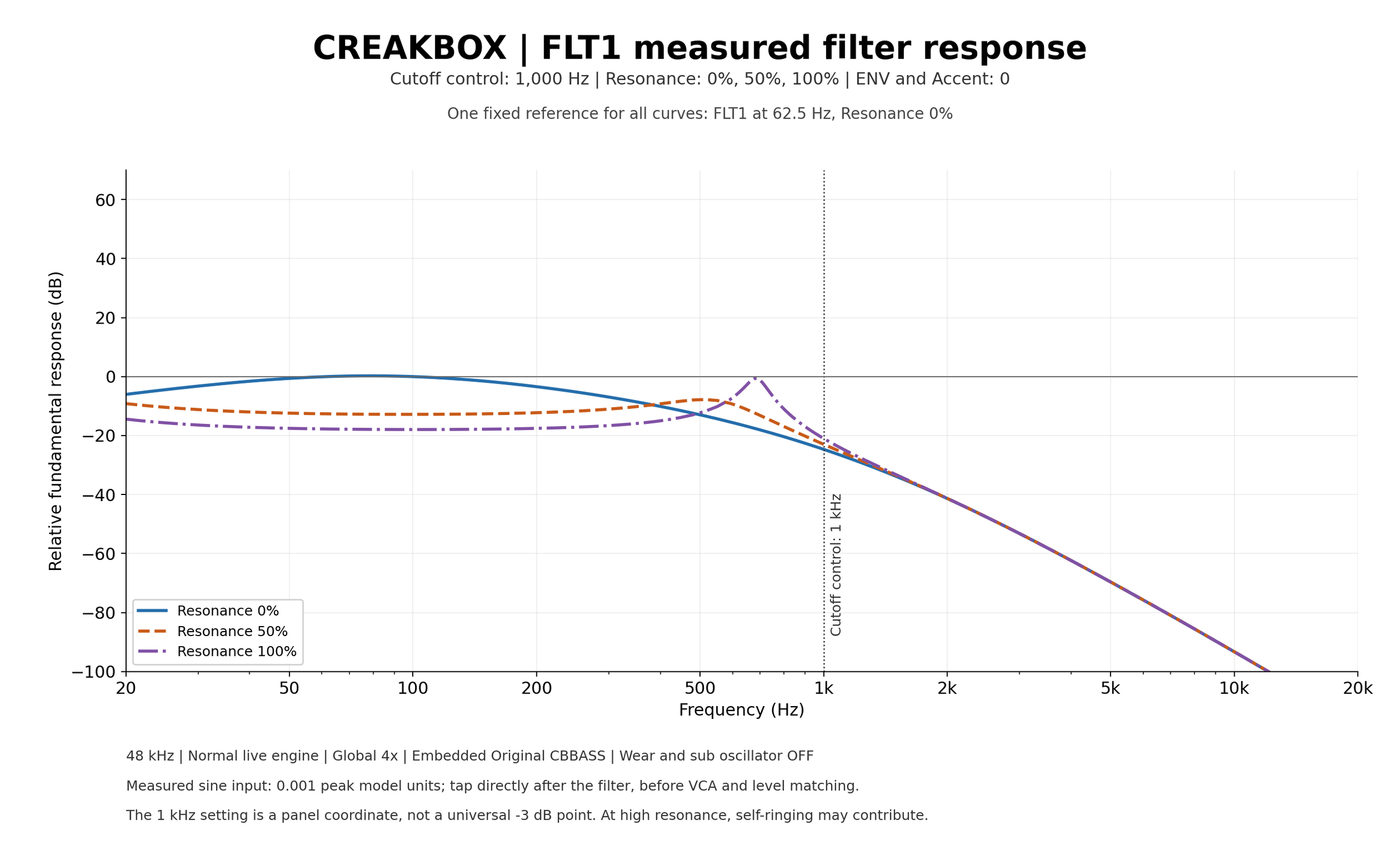
Open the detailed FLT2 response graph
Open the detailed FLT3 response graph
Open the detailed FLT4 response graph

Let the repeats become part of the rhythm.
Start with a phrase that already works dry. Add a little echo, choose a division that answers the phrase, and listen to the spaces between notes. If every step is already busy, a clear repeat often needs fewer input notes rather than more feedback.
| Control | How to use it musically |
|---|---|
| Power + DRY/WET | Power enables the delay path. DRY/WET balances the immediate sound against the echo return; more wet also reduces the immediate dry contribution. Keep a modest mix for a bass that stays centred, and raise it deliberately for breakdowns or transition effects. |
| SYNC: BPM / MS | BPM makes TIME choose one of the supported rhythmic divisions of the effective Host/Free tempo. MS uses milliseconds. This is echo timing, separate from the top panel’s transport SYNC. |
| TIME | Sets the repeat spacing. In BPM mode the choices cover 1/32T through 1/2D; T means triplet and D means dotted. At 120 BPM, 1/16 is 125 ms and 1/8D is 375 ms. Moving time with repeats active bends their pitch; use that as a performance gesture rather than expecting a transparent jump. |
| FEEDBACK | Sets how much of each repeat returns to the delay. More feedback makes a longer, more insistent tail. Near or beyond sustaining settings, level and ringing can build: bring it down before a large time change if you want a controlled transition. |
| HP | Removes low end from the delayed return/feedback path without thinning the dry bass in the same way. Raise it until the repeats stop competing with the kick and fundamental. |
| DUCK | Pushes the wet echo down while the dry source is strong, then lets the repeats return in the gaps. It is useful when you want audible space without blurring note attacks. |
| WOW | Adds slower delay-time movement: broad pitch wander and tape-speed character. A small amount loosens a static repeat; a large amount becomes a clearly pitched modulation effect. |
| FLUTTER | Adds faster, shallower time movement. Use it for fine instability and roughness rather than the wider movement of Wow. |
| SPREAD | Offsets wet taps around the centre for width. Zero is exact dual mono; higher values widen the repeats. Check mono compatibility when bass information in the repeats matters. |
For a tight acid echo, try a short division, low-to-moderate feedback, a high-passed return and some Duck. For a transition, let a marked note enter the delay, stop feeding new voice audio with CB-BASS power, and allow the recorded tail to continue. KILL is the separate panic action for clearing sounding state.
Give the line a room without moving it to the back.
| Control | How to use it musically |
|---|---|
| Power | Enables the parallel plate reverb. OFF bypasses its processing and clears its tank; turning it off cuts the reverb tail. Muting the bass source instead can leave the existing tail audible. |
| DECAY | Sets the tank’s decay behaviour. The supplied artwork abbreviates this control as DELAY; its function is Decay, not the independent PRE-DL control. Size and diffusion also shape the natural tail, so the sound does not necessarily stop at the displayed number of milliseconds. |
| SIZE | Changes the scale and density of the space. Small sizes can provide compact ambience, while larger sizes spread the response. Long decay at small size retains a dense tail; Size is not simply another wet-level knob. |
| PRE-DL | Delays the reverb input independently of Decay. A little pre-delay separates the dry note attack from the wash. Unlike echo BPM sync, this is a millisecond control. |
| LO-CUT | Removes low frequencies from the wet input. Raise it to keep the fundamental and kick more distinct while the upper part of the sound excites the reverb. OFF disables this low-cut filter. |
| DRY/WET | Sets the reverb balance. Start low and turn it up only until the bass feels placed. Echo and reverb share a single dry path; raising wet settings can reduce the immediate dry contribution, so two parallel spaces are not a reason to set both mixes high. |
For a close bass with a hint of space, keep Size compact, use a restrained Decay and trim the wet low end. For a wide passage, allow a longer tail but leave the dry attacks legible with pre-delay and a low wet mix. Compare in context: reverb that is barely obvious on its own can be enough under the full track.
Choose how the edge arrives.
The large DISTORTION knob sets amount; the small DISTORTION section selects the circuit and its FILTER control. Selecting a numbered type and enabling its path are separate decisions: a type lamp alone does not mean a zero-amount sound is distorted.
The four types respond differently to input level and tone settings. Start with a low amount, change one choice at a time and level-match with your DAW. Automatic distortion gain compensation helps, but it does not make the circuits perceptually identical.
| Control | How to use it musically |
|---|---|
| DIST1 | A staged, asymmetric saturation path with input emphasis and tone shaping. Try it when you want a rougher edge and added harmonic colour while keeping some of the original source in the amount blend. |
| DIST2 | A different, more symmetric soft-clipping transfer. Compare it for a rounder saturation character; the same amount is not the same gain/texture as DIST1. |
| DIST3 | A modeled amplifier-and-diode clipping circuit. Useful for a more pronounced driven edge. Its input conditioning and circuit response interact with amount, so check the body as well as the top end. |
| DIST4 | A compensated high-gain clipping circuit with its own tone/filter response. Try it for sustained, dense drive and then trim the tone into the track. It can feel much more processed than a lightly saturated voice. |
| FILTER | Moves the selected distortion model’s tone/filter control. It is distinct from the main bass Cutoff, and its meaning is model-dependent. Revisit it after changing type instead of assuming the same position produces the same brightness. |
TAPE / DRIVE and HYST.
The TAPE switch enables a separate magnetic saturation/compression stage. DRIVE controls how strongly it is driven; HYST. controls the influence of its stored magnetic state on later transients. Use small values for weight and transient rounding, or increase them for a more obvious history-dependent character. This is separate from the Tape Echo’s timing modulation.
When a bass loses punch after adding several nonlinear stages, compare them one at a time. You may need either more front-end edge or tape thickening, rather than both at high settings. Loudness alone is an unreliable guide to which choice improves the track.
Keep the low end intentional.
| Control | How to use it musically |
|---|---|
| SUB OSC selector | Selects OFF, one octave below or two octaves below. OFF stops the extra oscillator path. The source enters before filtering, so it can change filter drive as well as the amount of low bass. FLT4’s sub is divided from its main oscillator clock. |
| MAIN / SUBOSC | Sets the sub level when a sub mode is enabled. It is additive, not a crossfade away from the main oscillator. A large setting can increase pre-filter peaks. If it seems ineffective, check the SUB OSC selector and whether SRC is INT. |
| MAIN / WORN | Morphs supported components towards a deterministic, bounded worn-machine character. It can affect more than pitch stability. The saved underlying circuit values remain intact; turn Worn down to compare against the base configuration. EXT can also inherit the wear character of supported processing stages. |
| MAIN / HP | Trims low frequencies in the bass output path, with an OFF position. Use it to remove unwanted low-end weight rather than automatically discarding the fundamental. It is separate from Echo HP, Reverb LO-CUT and the model’s retained line-output coupling. |
Eight Quick knobs, chosen for your work
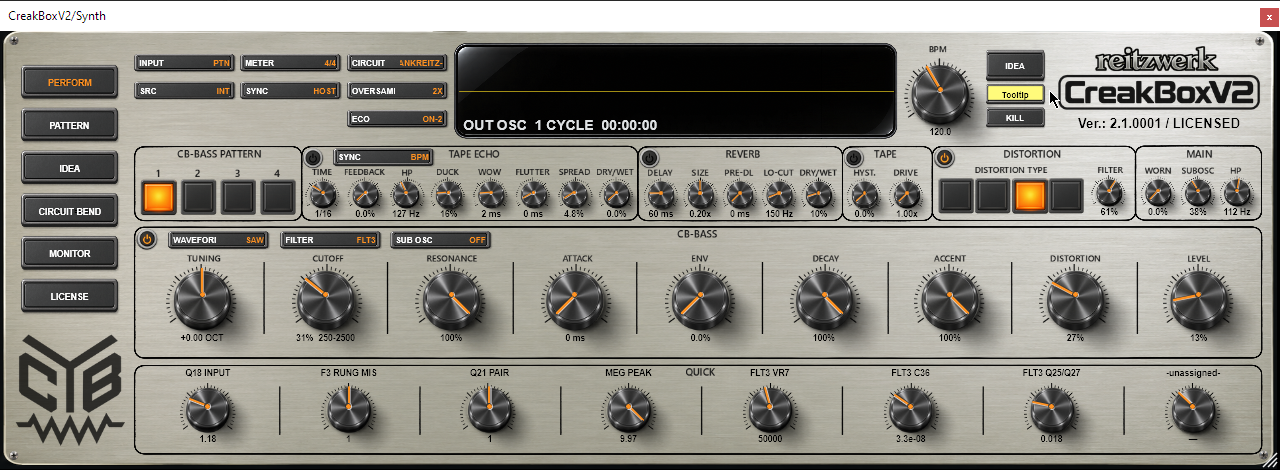
Quick knobs are direct access to their assigned parameters, not eight fixed macro effects. The caption and units tell you what each currently controls. There are separate Quick banks for FLT1–FLT4; switching filter recalls that bank without replacing your established assignments. A saved configuration can supply its own banks, and saved projects keep theirs.
With an active licence, open Circuit Bend, find a parameter and right-click its row to assign it to QUICK-1 through QUICK-8. The same menu can remove that parameter from the Quick knobs or open the selected filter’s Quick-default restoration dialog. Restoration offers explicit choices; do not use overwrite when you intend to keep your own assignments.
On Perform, use Quick just like a live control, including numeric entry and reset to the selected configuration’s target. A custom range can make a circuit parameter more playable. Changing a component can alter tuning, level or stability; save a useful machine configuration before a large experiment. Quick value editing and reassignment require licensed Circuit access.
Control gestures worth learning
Use Shift-drag for fine adjustments and right-click a continuous knob for numeric entry. Most main musical knobs use their panel-travel percentage; Tuning uses octaves, Attack uses time and Quick uses its parameter’s displayed units. Read the entry field before typing. Double-click resets to the selected circuit/configuration target, which can differ from a generic parameter default.
For a live sweep, hold Ctrl before starting the drag, move the knob and release to throw it into momentum. Release the mouse while Ctrl is held, or within one second of releasing Ctrl. It continues and reflects at the limits. Click the moving knob to take control again. KILL silences sounding state; it is not how you stop a throw. IDEA’s generation knobs have no momentum.
The large CB logo opens the panel-colour picker. The bottom-right striped handle resizes the instance; double-click restores its default size, and right-click offers size choices. These appearance changes are saved with the instance and do not make a different bass sound.
Choose quality, record the movement and save the whole sound.
Use a stable live setting while composing. Increase quality for demanding resonance/drive passages if the CPU budget allows, and listen again after changing ECO. “Higher” is a processing choice with a cost; the useful choice is the one that sounds right and runs reliably in your session.
| Choice | Practical consequence |
|---|---|
| ECO OFF | Uses the full normal live models. Choose it when you want the detailed circuit behaviour and have enough CPU. |
| ECO ON-1 / ON-2 | ON-1 uses the earlier faster engine; ON-2 reduces circuit work further. They retain the musical control framework, but fine nonlinear/circuit behaviour and tone can differ from OFF. |
| ECO ON-3 | For FLT3 it retains the ON-2 signal model with faster solves. Other filters use simpler oscillator/filter approximations and bypass some fine component effects. It can be useful for economy, but compare the final sound at the intended render quality. |
| Licensed live / offline | Live global quality offers 1X–16X. At 1X, authorized local antialiasing can still run selected nonlinear stages at higher internal rates. Host-declared offline rendering uses the full global 16× Normal path independently of the saved live choice. Prefetch alone keeps the licensed live-quality policy. |
| Free edition | FLT1 retains supported public-control automation and renders at strict internal 1×. Oversampling edits and Circuit/Quick editing are restricted. FLT2–FLT4 can be played and adjusted manually live, but host automation is ignored and host-declared offline/prefetch rendering is muted for those models. Keep these differences in mind before choosing the voice for a finished free-edition export. |
Turn a loop into a performance
Let the rhythm section run, then make a few deliberate moves: a gradual Cutoff opening, an Accent increase at the next section, or an echo-time gesture before a drop. Record supported public-knob moves as DAW automation with the host’s normal write/read workflow. For a hands-on passage you want to preserve exactly, record the audio output as well.
Save the DAW project for the full instance: sound, patterns, current IDEA workspace, quality and appearance. A .cbbp file is a four-pattern bank, not a complete sound preset. A .cbcb machine configuration stores sound/circuit setup and mappings, not the full IDEA tree. Keep these jobs separate when building a reusable library.
If you are testing an IDEA, edits on Perform belong to that branch while TEST IDEA or Lock Mode keeps it active. Use USE IDEA when it is ready to become the normal runtime. Leaving IDEA with both test modes off restores the earlier outside scene until you commit.
Useful shortcuts and quick diagnosis.
| Key or gesture | Action |
|---|---|
| Space | Starts/stops the internal clock in SYNC: FREE. In HOST, it is passed back for the DAW to handle. |
| 1–4 | Selects the four CB-BASS pattern slots. This does not copy or rewrite them. |
| I | Opens IDEA and generates a new root idea. It is different from simply opening the page with its button. |
| R | With Lock Mode OFF on Perform or Pattern, develops only the current pattern by IDEA’s DEVELOP AMOUNT. It does not create a tree child or change the sound. A zero amount does nothing. Use IDEA-DEVELOP for a protected branch operation. |
| Shift-drag / Ctrl-drag | Fine knob adjustment / live knob throw. Text fields and modal views retain their own keyboard input; the editor must receive the keys. |
If you cannot hear what you expect
No sound: check INPUT, SRC, transport, CB-BASS power, LEVEL and the destination pattern’s gates. EXT also needs the active sidechain bus. A changing output shape without an audible bass can indicate a routing/output issue rather than a pattern problem.
Attack does nothing: it needs an Attack-marked internal pattern step and audible filter modulation. It does not fade MIDI notes. Sub does nothing: enable a sub mode, raise its mix and use INT. Distortion suddenly returns: moving its amount above zero can re-enable it.
The sound changes on another page: check IDEA’s TEST/Lock state and whether the candidate was committed. The live and bounced sound differ: compare ECO/live quality against the licensed offline Normal 16× path, and check free-edition filter/render restrictions. A sound keeps moving: stop a thrown knob by taking control of it, and check host automation.