ANALOGUE SOUL.
CONTROLLED CHAOS.
Circuit-modelled bass. Sample-free drums. Magnetic tape, unstable echoes and enough control to turn a calibrated machine into something beautifully wrong.
VST3 · analogue circuit modelling
ABOUT THIS DOCUMENT
This document provides a complete functional overview of CREAKBOX V2 0.9.0043 or higher. It describes the instrument’s sound engines, controls, signal paths, pattern systems, performance functions, processing options, routing, and licence workflow.
It is intended both as a product specification and as a practical user reference. The sections follow the terminology used in the CREAKBOX interface, making it possible to look up individual controls, functions, and concepts while working with the plug-in.
CREAKBOX also includes an optional tooltip system. When tooltips are enabled, placing the pointer over a control displays a concise explanation of what the control affects, how it influences the sound, and any relevant usage considerations. The tooltips provide immediate guidance inside the plug-in, while this document provides the broader context and more detailed explanations.
Used together, the interface tooltips and this document form the CREAKBOX V2 user manual:
· Use the tooltips for quick guidance while working.
· Use this document for detailed descriptions, signal-flow context, feature scope, and reference information.
Unless otherwise stated, the specifications in this document describe the licensed Full version of CREAKBOX V2.
Complete Product Specification and description
CREAKBOX V2 Full Version
CREAKBOX is a sample-free, analogue-modelled acid workstation combining bass synthesis, drum synthesis, circuit bending and external stereo processing in one coherent real-time instrument. It offers two contrasting analogue filter characters, step-programmed filter Attack, an independent sub-oscillator, four distortion types including a model inspired by a popular analogue distortion pedal, tape echo, tape compression, resonant drum processing and recordable Knob Throw performance control.
• Windows x64 VST3.
• VST3 Sample32 and Sample64 host-buffer compatibility.
• 1x–16x real-time CB-BASS/EXT oversampling.
• Fixed 16x global offline oversampling.
• Additional offline analogue distortion pedal 1x–8x.
• INT/EXT stereo processing.
• Main, CB-BASS, and CB-DRUM stereo buses.
• Host/Free sync.
• Sample-offset MIDI and parameter automation.
• CB-BASS pattern and direct MIDI mode.
• CB-DRUM patterns and MIDI pattern/bank selection.
• Six-page resizable native editor in licensed Full.
• Circuit Bend, Quick mappings, Knob Throw, scope, and analyzer.
• Online and signed offline licence workflow in the Full version.
CREAKBOX is not merely another bassline emulation. It combines a sample-free acid instrument, an analogue-modelled drum machine, a stereo filter/effects module, and a deep Circuit Bend laboratory in a single plug-in. All internal sound generation takes place in real time: no samples, no sample ROM, no pre-rendered oscillators, and no hidden output peak normalisation.
What “100% analogue modelled” means in CREAKBOX
• 100% sample-free internal sound generation: Both CB-BASS and CB-DRUM synthesise every sound in real time.
• Analogue-modelled signal path: Oscillators, filters, envelopes, amplification, transistor and diode character, tape, clipping, feedback, and drum resonators recreate the behaviour and sound of classic analogue equipment.
• Not merely static waveforms and standard filters: The sound includes the movement, asymmetry, saturation, feedback interaction and gradual variation associated with analogue circuits.
• Digital control, analogue sound: The sequencer, MIDI, project state, and host integration are naturally digital. “100% analogue modelled” describes the audible internal sound generation and signal processing.
• Credible scope: CREAKBOX recreates the audible behaviour and character of selected analogue instrument and effects designs without claiming to be an exact copy of any individual vintage unit.
WHAT DISTINGUISHES CREAKBOX
One integrated acid system rather than a single-purpose instrument
• Bassline and drum machine in one instrument: CB-BASS and a complete seven-voice, sample-free CB-DRUM engine share clock, performance surface, and project state.
• Two genuinely different nonlinear filters: FLT1 is a four-pole diode ladder; FLT2 is a two-node two-pole analogue low-pass with self-oscillation.
• INT and EXT: The same filter/distortion/tape character can be applied to internal synthesis or external stereo audio.
• Suboscillator with a complete VCO model: The additional oscillator is an identical free-running circuit instance and its DSP is actually disabled in Off.
• Step Attack: Individual slow filter openings can be programmed on selected steps without making the VCA or every note slow.
• Circuit Bend allow you to control and modify every parameter of CreakBox.
• Three output buses: Main, CB-BASS, and CB-DRUM.
• Tape Echo as a real feedback machine: Separate HP/LP feedback, over-unity capability, saturation, ducking, wow, flutter, and stereo playback-head geometry.
• Knob Throw: Up to four continuing, reflecting, DAW-recordable parameter throws.
GENERAL
Native engine and plug-in architecture
• Native 64-bit: The production build targets Windows x64.
• Infinite tail declaration: The host is allowed to continue processing so that tape feedback and analogue drum tails are not cut off.
• DAW-owned workflow: The DAW owns the audio interface, sample rate, buffer size, recording, export, bus activation, and automation lanes.
Oversampling and render quality
• Real-time oversampling in licensed Full: 1x, 2x, 4x, 8x, or 16x.
• Exact rate multiplication: The selected factor directly multiplies the host sample rate. Example: 8x at 96 kHz runs the CB-BASS front end at 768 kHz.
• Coherent CB-BASS oversampling: VCO, sub-VCO, FLT1, FLT2, VCA/output stage, and the selected distortion are processed in the same oversampled voice path.
• EXT follows the same quality principle: Both stereo channels pass through the oversampled filter/output/distortion front end.
• Fixed 16x offline render: When the DAW explicitly marks bounce/render as offline, the Full version uses 16x global oversampling regardless of the real-time selection.
• Precise scope: The global oversampling control applies to the CB-BASS and EXT front end. CB-DRUM, tape echo, and final stem routing run at host rate.
INT/EXT – instrument and stereo effects processor in one plug-in
INT
• Enables the internal CB-BASS and CB-DRUM generators.
• Both pattern engines follow the same selected clock but may use different pattern lengths.
• Bass and drums retain separate synthesis, tail, and effect state.
EXT
• Uses the VST3 External Sidechain In bus as the stereo audio source.
• Disables internal bass and drum generation within the EXT render.
• Processes left and right channels through independent filter states.
• Lets the user select FLT1 or FLT2 as the stereo filter.
• Continues through the CB-BASS output stage, transistor colour, four distortion models, bass high-pass, tape echo, tape compression, master clip, and master volume.
• WORN can modulate cutoff and resonance in EXT without adding internal pitch/oscillator drift.
• EXT uses no internal VCO, suboscillator, note envelope, Slide, Accent, or pattern Attack.
• At high feedback, FLT2 can enter self-oscillation from a silent EXT input.
• The mono record head in Tape Echo is combined with the preserved L/R difference in the dry signal, so stereo input does not collapse to mono.
• The result is sent to Main Out and CB-BASS Out.
• CB-DRUM Out is silent in EXT.
Audio, MIDI, and output buses
• 1 × stereo External Sidechain In as an optional VST3 aux input.
• 1 × stereo Main Out, active by default.
• 1 × stereo CB-BASS Out as a separate bass stem.
• 1 × stereo CB-DRUM Out as a separate combined drum stem.
• 1 × 16-channel MIDI In.
• Main, bass stem, and drum stem can be routed separately in a DAW that supports VST3 aux outputs.
• The CB-DRUM engine is mono and is written dual-mono to its stereo bus; it does not provide seven individual drum outputs.
• There is no MIDI output bus.
CB-BASS/CB-DRUM crossfade and headroom
• The crossfader affects Main Out only; the two dedicated stems retain their full level.
• At the left endpoint, CB-BASS is at unity and CB-DRUM is at 0.
• From the left endpoint to the centre, drums rise while bass remains at unity before common headroom.
• From the centre to the right endpoint, drums remain at unity while bass falls.
• This is intentionally not an equal-power crossfade and not a dynamic peak normaliser.
• Both machines, sequencers, and tails continue running at the crossfader endpoints, allowing blending back without phase/state restart.
Host sync, Free clock, and timing
• HOST: Synchronises playback, tempo, pattern position and transport changes with the DAW.
• FREE: Internal clock from 40–300 BPM with its own PLAY/STOP.
• Free PLAY/STOP is a transient performance command; a reopened project never starts playback automatically.
• Reliably follows the DAW when playback starts, stops, jumps to another position, or loops.
• Tempo changes alter future step boundaries without resetting analogue circuit states.
• 4/4: Four CREAKBOX steps per quarter note.
• TRIPLET: Three CREAKBOX steps per quarter note.
• Meter is selected in CREAKBOX; the plug-in does not automatically read the host time signature.
• Bass and drum patterns have independent lengths from 1 to 16 steps.
• Pattern changes occur immediately when stopped, during initial chase, or after a seek.
• During continuous playback, new pattern/bank selections are queued until the relevant machine reaches its next local pattern wrap.
• Tape Echo time is measured in milliseconds and has no beat-division/tempo-sync function.
CREAKBOX does not simply place every step event on a sterile grid. The CB-BASS scheduler can model the original digital board’s latch, gate, and interrupt behaviour:
• Gate duty centre and duty variation.
• Separate minimum/maximum Gate-on latencies.
• Separate minimum/maximum Gate-off latencies.
• Sample-accurate conversion of very short pulses; at insufficient host resolution they become deterministic same-sample events.
• Timing values are Circuit Bend parameters and can be used for both hardware calibration and controlled timing deformation.
MIDI triggering
PATTERN note source
When Note Source is set to PATTERN, 16 consecutive MIDI notes act as performance selectors:
• MIDI 24–27: CB-BASS patterns 1–4.
• MIDI 28–31: CB-DRUM patterns 1–4.
• MIDI 32–39: CB-DRUM factory banks 1–8.
• Pattern/bank selection is returned to the host as a parameter change when an output parameter queue is available.
MIDI note source
• Incoming MIDI notes directly control CB-BASS pitch and Gate.
• All 16 MIDI channels are accepted; the channel is not filtered.
• Last-note priority.
• Note On with velocity 0 is treated as Note Off.
• Velocity does not continuously scale volume; it activates Accent at or above an adjustable threshold.
• Accent threshold: 1–127, default 100.
• Optional legato Slide for overlapping notes.
• When the active note is released, the engine falls back to the most recently held note without an unnecessary Gate break.
• When the last note is released, Gate closes.
• All Notes Off, All Sounds Off, and relevant legacy Omni CCs clear the note stack and Gate.
• CB-DRUM continues from its pattern engine in MIDI note mode.
• Pattern Attack is not applied to direct MIDI notes.
MIDI scope
• No direct MIDI pad mapping for the seven drum voices.
• No pitch bend, pressure, MPE, or continuous velocity amplitude.
• No built-in MIDI Learn/CC mapping; the DAW’s parameter/controller mapping can be used for host-exposed parameters.
Pattern and bank architecture
• Four current CB-BASS patterns per bank.
• Four current CB-DRUM patterns per bank.
• Each pattern stores 16 steps and an individual active loop length from 1 to 16.
• Hidden steps above the active length are preserved and return if the length is increased.
• Pattern content is stored in project state and is not represented as artificial automation parameters.
• The project is marked dirty when a pattern change is accepted.
• Live pattern edits do not automatically reset already-triggered analogue envelopes or tails.
• Named bank formats:
– .cbbp – complete four-pattern CB-BASS bank.
– .cbdp – complete four-pattern CB-DRUM bank.
– .cbcb – Circuit Bend/machine configuration.
• External bank/circuit files are linked by name and path hint, while a complete embedded snapshot remains stored in the project.
• If a linked file is missing, the user can locate it or choose the default resource without the project first becoming silent.
Project state and preset integrity
• Bounded maximum state size.
• Stores, among other data:
– Physical/plain parameter values.
– Four CB-BASS patterns.
– Four CB-DRUM patterns.
– Pattern lengths and step flags.
– Eight Quick mappings and their ranges.
– Interface and presentation colours.
– Active profile/bank metadata.
– External file references.
– Drum Mute restore state.
• A normal .vstpreset/DAW component state can therefore be self-contained.
• Live oscillator phases, filter history, active MIDI notes, and running transport are not serialised. A normal setState preserves existing CB-DRUM DSP state; exact reset/persistence behaviour on load therefore depends on the host plug-in lifecycle.
Hardware Profiles
• Classic Bassline: The integrated standard machine.
• Extended Bassline: An extended profile with, among other things, broader control ranges, stronger filter feedback, altered Env Mod calibration, and faster Gate behaviour.
• The two profiles are implemented as a true two-entry VST ProgramList.
• Selecting a profile loads a complete, known hardware/Circuit Bend snapshot and Quick mapping.
• CB-BASS and CB-DRUM pattern banks are preserved when profiles are changed.
• Both built-in profiles contain defaults for the complete schema and therefore also reset all 41 CB-DRUM schema parameters—including On, enabled mask, voice controls, tape, and high-pass—to the same drum defaults; the drum patterns themselves are preserved.
• User-saved .cbcb files can appear alongside the built-in machines in the profile selector.
• Restoring a customised project displays derived profile metadata without overwriting custom values.
Circuit Bend – from performance instrument to circuit laboratory
• Dedicated CIRCUIT BEND page.
• 206 of the 207 active schema/audio parameters can be edited directly through grouped tabs and a compact two-column overview; audio.source is instead controlled by the INT/EXT selector in the header.
• Component, calibration, timing, drift, routing, envelope, filter, VCA, tape, output, and drum parameters can be edited live.
• Precise numeric entry in units.
• Double-click resets a Config parameter to its schema default.
• Any relevant active parameter can be assigned to one of eight Quick knobs.
• Quick mappings may define their own minimum and maximum ranges.
• Circuit Bend files store a parameter snapshot, waveform, Quick mappings/ranges, and UI colours.
• 22 dedicated FLT2 two-pole analogue component parameters.
• 41 dedicated CB-DRUM schema parameters.
• Exposed VCO, CV/DAC, Gate, diode-ladder, Accent, analogue VCA, tape, echo, distortion, and scheduler parameters.
• Extreme Circuit Bend settings are allowed to move the sound far beyond stock; UI tooltips warn about gain, feedback, CPU, and instability.
Quick controls
• Eight compact Quick slots on the Perform page.
• Stored per project and in .cbcb.
• Can be defined differently in Classic Bassline, Extended Bassline, and user circuits.
• A dedicated min/max range makes a broad component range usable as a musical performance control.
• Readouts follow the relevant parameter unit: percentage, Hz, ms, multiplier, or On/Off.
• Unassigned Quick slots are clearly inactive.
Knob Throw
Knob Throw is CREAKBOX’s performance mechanism for automation movement that continues after the mouse is released:
• Hold Ctrl from mouse-down.
• Drag the selected knob and release the left mouse button to throw it.
• The full, unbounded drag distance determines direction and speed.
• Movement continues without friction and reflects at the parameter minimum and maximum.
• Up to four throws can run simultaneously.
• A blue pulsing indicator shows an active Throw.
• Ctrl may be released up to one second before mouse-up without losing the intended throw.
• An active throw continues even if Ctrl is released after mouse-up.
• Each Throw is a correct host edit gesture and can therefore be recorded as DAW automation.
• There is no hidden internal automation timeline; the result remains normal, editable DAW automation.
GUI and live workflow
• Hardware-inspired brushed-silver VSTGUI interface.
• Logical design size 1180 × 610.
• Proportional scaling from approximately 826 px to 2360 px width, limited by the screen work area.
• Window size is remembered.
• Six pages in licensed Full:
– PERFORM.
– CB-BASS.
– CB-DRUM.
– MONITOR.
– CIRCUIT BEND.
– LICENSE.
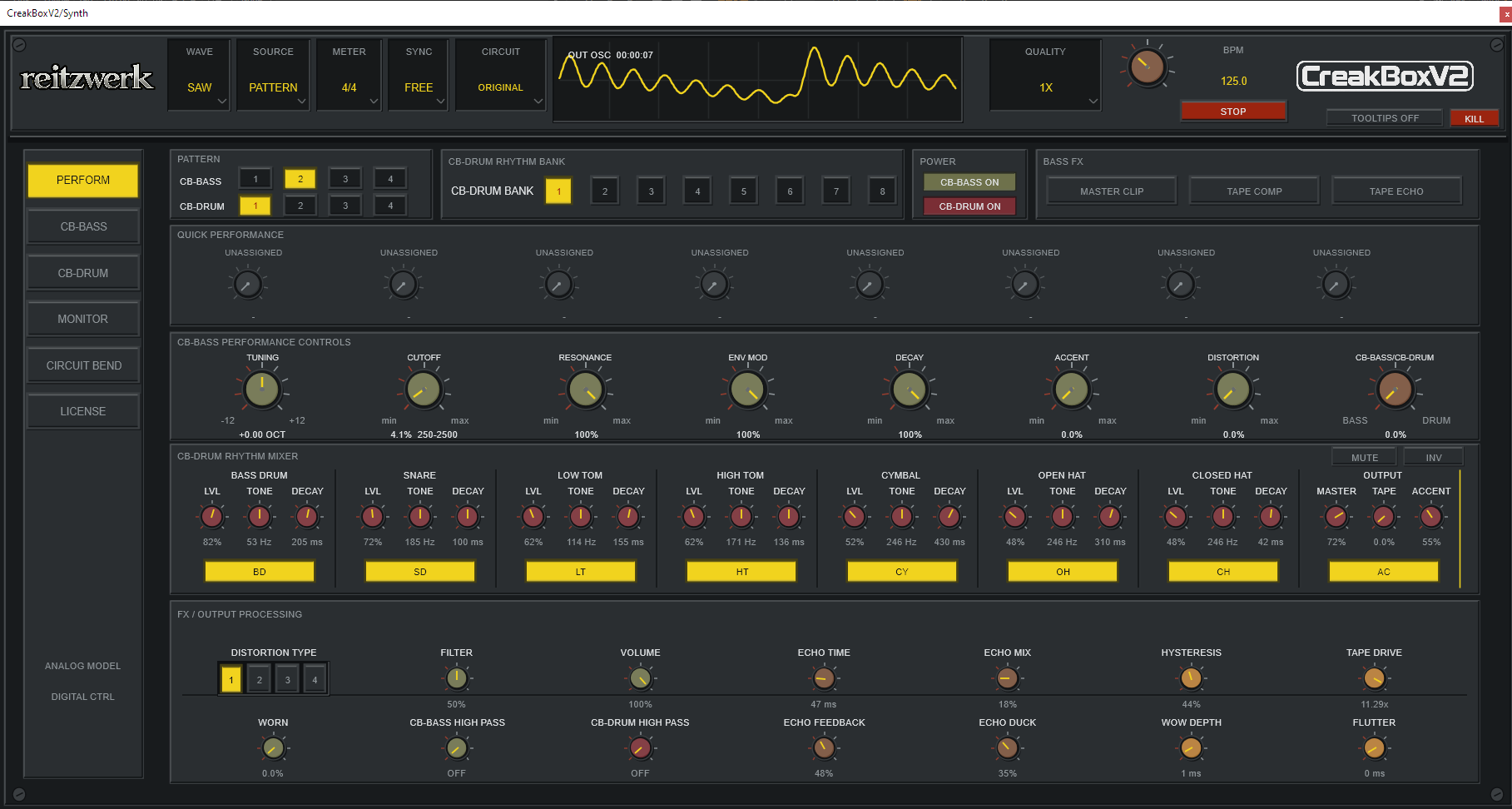
• PERFORM gathers the primary controls for both machines on one page without separate space-consuming Mixer/FX pages.
• Nine large main controls:
– Tuning.
– Cutoff.
– Resonance.
– Attack.
– Env Mod.
– Decay.
– Accent.
– Distortion.
– CB-BASS/CB-DRUM Mix.
• Compact header controls for INT/EXT, FLT1/FLT2, Sub Off/−1/−2, Sub Mix, Saw/Square, Pattern/MIDI, 4/4/Triplet, Host/Free, profile, and oversampling.
• Dedicated KILL/Panic control can stop all sound states without deleting patterns, parameters, or transport selections.
• Right-clicking rotary controls opens precise numeric value entry.
• Parameter-dependent parsing and display of Hz, ms, seconds, percentage, and multipliers.
• Optional tooltips follow the structure Affects / Sound / Watch / Use.
• Tooltip preference is retained between editor openings.
• Fixed post-master mini oscilloscope in the header.
• Waveform selection temporarily displays exactly two settled cycles of the selected raw oscillator and then automatically returns to Main Out display.
Monitor
• Read-only tap after the complete Main Out signal path.
• Visual range around −72 to 0 dB.
• Monitor changes no DSP parameters and does not use the separate stems as its source.
• Status is published approximately 30 times per second and on relevant transport/pattern changes.
• The Monitor is not a calibrated mastering meter, it’s more a sound-design tool to see what’s going on
Keyboard and performance shortcuts
• 1–4: Select CB-BASS pattern 1–4.
• 5–8: Select CB-DRUM pattern 1–4.
• Shift+1–8: Toggle BD, SD, LT, HT, CY, OH, CH, and Accent.
• R: Randomise the current CB-BASS pattern.
• Space: Start/stop CREAKBOX in Free mode.
• In Host mode, Space is not consumed by the plug-in and can continue controlling DAW transport.
• Shortcuts are disabled during text entry and modal dialogs.
Online and offline licence workflow
• Dedicated LICENSE page in the Full version.
• Online licence activation.
• Import of a signed offline licence file.
• Removal of an installed offline licence.
• Secure, OS-protected local online cache.
• Periodic revalidation takes place without network or file work on the audio thread.
• Restricted Full/Preview is forced to 2x real-time oversampling, permits only Cutoff automation, hides/gates the Full UI and Circuit Bend, and mutes offline/prefetch render; the complete specifications in this document apply to the licensed Full version.
CB-BASS
The signal path has the same core character in INT and EXT from the filter/output section onward. INT generates oscillator and control envelopes; EXT supplies stereo audio directly to the filter input.
Distortion I–III retain their historical coupling after the distortion, while Model IV places line coupling before the external analogue distortion pedal. The user’s CB-BASS Highpass is placed after the selected distortion in both cases.
Oscillator
• Two selectable source waveforms: Saw and Square.
• The square circuit remains electrically connected and can therefore affect loading of the saw branch rather than behaving as two independent wavetable sources.
• Optional VCO output low-pass with 0 Hz as true bypass.
• Tuning: −12 to +12 semitones.
• The reset/edge sequence is evaluated at the oversampled rate; the common subsequent decimator provides anti-alias protection.
• All source parameters are copied to the suboscillator when it is active.
Suboscillator
• Three modes:
– OFF.
– −1 OCT.
– −2 OCT.
• The suboscillator is an independent, free-running instance of the complete CB-BASS VCO—not a simple digital divider.
• It always uses the same selected waveform as the source: Saw follows Saw, Square follows Square.
• −1 OCT runs at half the main oscillator frequency.
• −2 OCT runs at one quarter of the main oscillator frequency.
• All VCO component/calibration values are shared with the main oscillator.
• It has its own phase and therefore creates living, frequency-dependent summation relationships.
• SUB MIX blends from the pure main oscillator to equal weighting between main and sub.
• The pre-filter mix is calculated as (main + mix × sub) / (1 + mix).
• Normalisation preserves nominal filter headroom; full Sub Mix is not a hidden +6 dB gain stage.
• The blend occurs before FLT1/FLT2, so both oscillators hit the same nonlinear filter.
• OFF skips the entire additional oscillator render and saves CPU.
• Switching from OFF to active resets the suboscillator to a fresh free-running start phase.
• Suboscillator and Sub Mix are inactive in EXT.
• Selector and miniature Sub Mix knob reside in the existing header, requiring neither a larger GUI nor an extra page.
CV, Gate, and VCA articulation
• Gate threshold: 0.5–6 V, default 2.5 V.
• Note latch and Gate edge are separate events.
• VCA Gate delay: 0–20 ms, default 4 ms.
• VCA attack: 0.1–30 ms, default 3 ms.
• VCA release: 0.1–30 ms, default 1.5 ms.
• VCA decay: 16 ms–6 s, default 3 s.
• Deterministic open-VCA noise follows VCA gain.
• Normal note, Rest, Tie, Slide, and Gate Off use distinct sequencer semantics.
• Gate Off uses Rest encoding in the editor.
• Imported Tie data is preserved by the bank/project format even though Tie has no separate visible editor row.
Slide
• Slide is activated only when a new note arrives while the previous Gate remains high.
• Slide time: 5–500 ms, default 60 ms.
• Without Slide, pitch CV jumps immediately to the destination.
• A Slide flag on the source step keeps Gate open into the next pitched destination.
• In MIDI mode, overlapping notes create Slide when MIDI Legato Slide is On.
• Last-note fallback preserves legato behaviour when the upper note is released.
Pattern Attack
• ATTACK is a separate pattern feature and a large performance knob.
• Each CB-BASS step has its own Attack On/Off flag.
• The Attack row appears immediately after Slide in the pattern editor.
• Attack knob: 0–2 seconds, default 0.25 s.
• 0 is true disable: Attack-marked steps immediately return to the normal classic analogue filter envelope.
• The function applies only to gated internal pattern steps with Attack On.
• Direct MIDI notes, unmarked pattern steps, CB-DRUM, and EXT are unaffected.
• On an Attack step, only the filter Env Mod source is reset.
• Filter modulation gradually opens toward approximately 98.5% over the selected Attack time.
• Base Cutoff is not moved directly.
• The VCA does not become a slow volume fade.
• The Accent VCA’s separate source envelope retains its normal fast attack.
• Attack can retrigger the filter MEG on a Slide step even when Slide suppresses the normal Gate edge.
• The result is step-programmable slow filter opening without destroying classic Gate, Slide, or Accent behaviour.
Accent
• Accent can be programmed per pattern step.
• Direct MIDI activates Accent via the adjustable velocity threshold.
• Accent Amount: 0–1.5, default 0.65.
• Accent Sweep can alter cutoff in octaves and interacts with the resonance-pot network.
• Total VCA control combines the normal envelope and Accent envelope rather than merely multiplying the complete output by a fixed velocity value.
• An accented Slide can retrigger the Accent/MEG event without requiring a normal Gate edge.
• Base VCA gain and Accent VCA gain can be Circuit Bent independently.
Filter envelope and Decay
• Normal MEG attack: 50 µs–10 ms, default 100 µs.
• The panel Decay minimum and maximum can be redefined per profile/circuit.
• Env Mod Amount: 0–1.
• Stock Env Mod includes modelled minimum, bias, and depth.
• The Extended Bassline profile can reach greater depth and a true zero minimum.
• Envelope and Accent modulation remain sample-fast; only manual/automated base cutoff is smoothed.
FLT1
FLT1 emulates a nonlinear four-pole diode-ladder low-pass filter with a strong, resonant bassline character.
• Four pole 18 dB/octave ladder character, affected by the complete coupling networks.
• Feedback extension multiplies the entire non-zero FLT1 resonance curve, raising both the ongoing feedback response and maximum range toward self-oscillation and saturation.
• Filter input drive, diode drive, diode asymmetry, and feedback saturation can be adjusted separately.
• Cutoff: 18–8000 Hz.
• Logarithmic 8 ms smoothing on base cutoff.
• Envelope and Accent are applied without equivalent slow smoothing.
• Resonance-dependent Accent-pot geometry.
• Optional FLT1 input-bias high-pass: 0–80 Hz, default 0/true bypass.
• Postamp gain and resonance gain compensation can be Circuit Bent.
• FLT1 responds to WORN drift in cutoff, resonance, Env Mod, decay, and related analogue behaviour.
FLT2
FLT2 emulates a two-pole analogue low-pass filter known for an aggressive, characterful resonance response.
• Nonlinear 12 dB/octave two-pole analogue modelled low-pass module.
• The passive end stop is reached progressively toward approximately 90%.
• Nominal maximum PEAK return gain around 1.075.
• The optional Hybrid Noise parameter is separate from the self-oscillation seed.
• Cutoff, Env Mod, and Accent use the common CB-BASS control calibration.
• 22 dedicated FLT2 Circuit Bend parameters.
• FLT2 can be used in INT and in both EXT stereo channels.
• FLT2’s high-resonance loop is processed even with silent input so that self-oscillation is not stopped by normal silence optimisation.
Filter model switching
• FLT1 and FLT2 are consistently labelled FLT1 and FLT2 in the performance UI.
• Model selection is automatable.
• Switching filters is not a hard state jump.
• The new filter is safely reset, both filters render during the transition, and the output crossfades over approximately 12 ms.
• The same transition principle is used in INT and EXT.
• Older projects without filter-model data open with FLT1 for sound compatibility.
WORN
• WORN adds slow, deterministic analogue component drift.
• 0 is exactly neutral/bypass.
• INT can drive:
– Pitch.
– Cutoff.
– Resonance.
– Env Mod.
– Decay.
– Accent.
• Different quantities move at different sub-audio rates instead of following a single common LFO.
• WORN is not merely an audio-noise layer.
• EXT applies only relevant cutoff/resonance drift because EXT has no internal pitch or note envelope.
• Identical render state produces reproducible drift.
analogue VCA and analogue output stage
• Both filter models pass through the same output architecture.
• Deterministic VCA noise follows opening gain.
• Voice Output Gain determines how hard the subsequent transistor/distortion path is driven.
• Line-coupling high-pass: 0.5–40 Hz, default 5 Hz.
• User CB-BASS High Pass/Bass Trim: 0–500 Hz.
• 0 Hz is true bypass.
• The high-pass sits in the bass output path before tape echo/master and affects both CB-BASS stem and the bass contribution to Main.
Four distortion models
Shared performance controls:
• DISTORTION: 0–100% amount.
• FILTER: Shared tone control.
• TYPE: I, II, III, or IV.
• Amount 0 provides bypass and avoids unnecessary nonlinear processing.
• A static feed-forward make-up curve compensates expected type/amount differences after decimation.
Distortion I
• Tone low-pass and 12 Hz DC removal.
• Wet/dry control through Distortion Amount.
Distortion II
• Brighter, more aggressive symmetrical clipping than Type I.
• Shared FILTER and VOLUME.
Distortion III
• Hybrid of the first nonlinear stage and the deep asymmetric stage.
• Combines greater transient definition with asymmetric harmonic density.
• Shared FILTER and VOLUME.
Distortion IV – popular analogue distortion pedal
• Modelled tone network.
• Audio-taper Distortion, Filter, and Volume pots.
• analogue distortion pedal line coupling is physically located before the pedal circuit, including when Amount is 0.
• One analogue distortion pedal solve per already globally oversampled real-time sample.
• Separate 1x/2x/4x/8x local substepping during offline render.
Stereo Tape Echo
Tape Echo is placed after the bass/EXT filter, output, and distortion path, and before CB-BASS tape compression, clipping, and master volume.
Core functions
• On/Off switch.
• OFF is exact dry bypass and resets echo state.
• Delay Time: 20–2000 ms, default 320 ms.
• Delay changes are smoothed over approximately 20 ms, creating natural pitch bend rather than hard buffer jumps.
• One common mono record/feedback head.
• Stereo playback heads.
• Soft record saturation with fixed tape bias.
• Tape/echo tail continues when new bass notes stop.
Filtering and feedback
• Echo Highpass: 10–5000 Hz, default 120 Hz.
• Echo Lowpass: 200–20000 Hz, default 6000 Hz.
• Highpass Feedback: 0–0.98, default 0.
• Lowpass Feedback: 0–1.25, default 0.48.
• HP and LP feedback branches are summed.
• LP feedback can exceed unity.
• Combining the two feedback branches can create self-building, saturated echo feedback.
• Record saturation constrains feedback in an analogue manner instead of adding a hidden digital hard limiter afterward.
Mix and ducking
• Dry/Wet: 0–100%, default 30%.
• Duck Amount: 0–100%, default 35%.
• Duck Attack: 1–100 ms, default 8 ms.
• Duck Release: 20 ms–2 s, default 180 ms.
• Duck envelope follows the dry input.
• Only the wet return is attenuated, preserving the direct bass attack.
Wow and flutter
• Wow Depth: 0–10 ms, default 1.6 ms.
• Wow Rate: 0.05–3 Hz, default 0.38 Hz.
• Flutter Depth: 0–3 ms, default 0.18 ms.
• Flutter Rate: 2–20 Hz, default 6.3 Hz.
• The two modulation layers are summed at the variable playback head.
Stereo Spread
• Stereo Spread: 0–100%, default 0.
• Left/right playback heads offset by up to approximately ±10 ms.
• The common centre head remains the feedback source.
• 0 is exact dual-mono compatibility.
• The dry INT signal is centred.
• In EXT, the original L/R difference component is retained in the dry signal.
Tape Compression
• Dedicated CB-BASS TAPE COMP On/Off.
• Located after Tape Echo.
• Maximum Magnetic Drive: 1–12x, default 5x.
• Tape Asymmetry: −0.3 to +0.3, default 0.055.
• Hysteresis: 0–1, default 0.16.
• Magnetic Memory: 50 µs–20 ms, default 1.5 ms.
• Input/memory difference drives the hysteresis term.
• Static drive/master-derived make-up in the VST path.
• Processed independently on left and right channels after stereo echo.
Master Diode Clip
• Dedicated CB-BASS MASTER CLIP On/Off.
• Located after Tape Compression and before smooth master volume.
• Clip Output Limit: 0.2–1.5, default 0.85.
• Diode Mismatch/Asymmetry: −0.3 to +0.3, default 0.025.
• Clip can operate at any subsequent master-volume setting because Volume follows it.
• Processed independently on left and right channels.
CB-BASS Master
• Master Volume: 0–1, default 0.35.
• Approximately 20 ms parameter smoothing.
• Order: Tape Echo → Tape Compression → Master Clip → smoothed Master Volume.
• The same completed signal is sent to CB-BASS Out and the bass branch of the Main crossfader.
CB-BASS pattern editor
• Four patterns per bank.
• 16 stored steps per pattern.
• Active length 1–16.
• GATE row.
• ACCENT row.
• SLIDE row.
• ATTACK row immediately after Slide.
• Imported Tie is retained in state/bank format but has no separate editor row.
• Pattern tools:
– Randomise.
– Transpose down one semitone.
– Transpose up one semitone.
– Rotate Left.
– Rotate Right.
– Copy Pattern.
– Paste Pattern.
– Direct length selection plus minus/plus.
– Load Bank.
– Save Bank.
• The randomiser generates notes, rests, accents, slides, and Attack flags.
• Pattern Copy/Paste includes all 16 steps and active length.
• The .cbbp schema stores note, Gate/Rest, Tie, Accent, Slide, and Attack.
CB-DRUM
Sample-free analogue drum machine
CB-DRUM is an integrated seven-voice drum engine inspired by a classic compact analogue rhythm machine. Every hit is synthesised in real time, and no samples are used.
• Seven simultaneous instrument voices:
– Bass Drum.
– Snare Drum.
– Low Tom.
– High Tom.
– Cymbal.
– Open Hat.
– Closed Hat.
• An eighth pattern lane controls shared Accent.
• Deterministic noise and fixed oscillator start phases.
• No samples, sample layers, or round-robin sample bank.
CB-DRUM does not pass through CB-BASS Distortion I–IV, Tape Echo, Tape Compression, Master Clip, WORN, or CB-BASS Highpass. It has its own mixer colour, tape overdrive, and resonant output high-pass.
Bass Drum
• Two separate damped resonators.
• Nominal base frequencies:
– Lower Resonator: 53 Hz.
– Upper Resonator: 92 Hz.
• Both resonators are scaled by BD Tone.
• Lower frequency Circuit Bend range: 35–90 Hz.
• Upper frequency Circuit Bend range: 60–150 Hz.
• Two different ringing times:
– Lower body approximately BD Decay × 2.1.
– Upper body approximately BD Decay × 1.42.
• Separate fast attack/aux envelope around 10.5 ms.
• Nonlinear VCA/envelope shape.
• Level: 0–1.5, default 0.82.
• Tone: 0.5–2.0, default 1.
• Decay: 40–800 ms, default 205 ms.
• Accent affects trigger impulses, resonators, and envelopes.
Snare Drum
• Nominal resonator frequency: 185 Hz.
• Base frequency can be Circuit Bent from 100–320 Hz.
• Tone multiplier: 0.5–2.0.
• Separate deterministic noise source.
• Noise generator with lightly asymmetric nonlinear shaping.
• 18 Hz DC removal on raw noise.
• 14.5 kHz low-pass on the noise base.
• Band-pass and high-pass components are mixed to form snare noise.
• Independent tone envelope.
• Independent noise envelope.
• Short auxiliary transient in the noise path.
• Separate nonlinear VCA curves for tone and noise.
• Level: 0–1.5, default 0.72.
• Decay: 20–500 ms, default 100 ms.
Low Tom
• Independent damped resonator.
• Nominal base frequency: 114 Hz.
• Base-frequency Circuit Bend range: 65–190 Hz.
• Tone: 0.5–2.0.
• Nonlinear VCA curve.
• Level: 0–1.5, default 0.62.
• Decay: 30–600 ms, default 155 ms.
• No artificial snare noise is added to the tom.
High Tom
• Independent damped resonator.
• Nominal base frequency: 171 Hz.
• Base-frequency Circuit Bend range: 100–300 Hz.
• Tone: 0.5–2.0.
• Nonlinear VCA curve.
• Level: 0–1.5, default 0.62.
• Decay: 30–600 ms, default 136 ms.
• No artificial snare noise is added to the tom.
Six-oscillator metal bank
• Six free-running pulse oscillators are summed into one common metal bus to generate a metallic sound.
• Shared Metal Tune: 0.5–2.0.
• The metal bank restarts only if it is actually powered down; normal On/Off routing allows phase to continue.
• CY, OH, and CH each have their own subsequent filter, envelope, and VCA path.
• There is no hidden separate cymbal bank or sample layer.
Cymbal
• Metal bus through a shared active filter around 5.05 kHz.
• Additional cymbal filters around 4.65 kHz and 7.35 kHz.
• Band-pass and high-pass components are mixed for metallic width.
• Independent CY Tone changes cymbal-filter response rather than creating a new oscillator bank.
• Independent main envelope and short auxiliary transient.
• Nonlinear VCA shape.
• Level: 0–1.5, default 0.52.
• Tone: 0.5–2.0.
• Decay: 50 ms–2 s, default 430 ms.
Open Hat
• Same free-running metal bank, with an independent active filter path around 7.05 kHz.
• Individual OH Tone.
• Long main envelope plus short auxiliary transient.
• Nonlinear VCA shape.
• Level: 0–1.5, default 0.48.
• Tone: 0.5–2.0.
• Decay: 40 ms–1.5 s, default 310 ms.
• A subtle tempo-dependent decay correction can alter the opening at different values of the stored Free BPM parameter; it does not separately follow current host tempo.
Closed Hat
• Same free-running metal bank, with an independent active filter path around 8.9 kHz.
• Individual CH Tone.
• Short main envelope plus separate auxiliary transient.
• Nonlinear VCA shape.
• Level: 0–1.5, default 0.48.
• Tone: 0.5–2.0.
• Decay: 5–300 ms, default 42 ms.
• A Closed Hat trigger directly resets the Open Hat envelopes.
• Choke therefore occurs in envelope/charge state rather than merely muting the finished mix bus.
CB-DRUM Accent
• Accent is a shared pattern lane, not an independent sound.
• When a step contains both an instrument hit and Accent, the trigger impulse and envelopes are scaled.
• Trigger factor follows 1 + Accent Amount.
• Accent Amount: 0–1.5, default 0.55.
• The global Accent lane can be disabled without changing pattern cells.
• An empty Accent cell without an instrument hit is allowed but produces no sound.
• Instrument MUTE and INV preserve Accent-lane state.
analogue mixer-inspired mixer and output drive
• All seven voices are summed before output effects.
• Mixer Drive: 0.35–4.0, default 1.15.
• Predominantly linear at stock levels.
• Positive and negative overloads use different curves.
• 7.2 Hz DC removal after mixer colour.
• This is the drum engine’s own saturation, not a fifth CB-BASS distortion type.
• High voice levels and Mixer Drive can therefore hit the output network more aggressively without hidden normalisation.
CB-DRUM Tape Overdrive
• Dedicated Tape Amount: 0–1, default 0.
• Amount is squared so the lower part of the control is more finely graduated.
• Maximum Magnetic Drive: 1–20x, default 8x.
• Tape Asymmetry: −0.3 to +0.3, default 0.04.
• Hysteresis: 0–1, default 0.18.
• Magnetic Memory: 50 µs–20 ms, default 1.5 ms.
• Tape-head Lowpass: 4–22 kHz, default 16 kHz.
• The hysteresis term uses the difference between the current signal and memory.
• Tape-head low-pass rounds the magnetic output energy.
• Wet interpolation between dry mixer and magnetic output.
• At Amount 0, tape states continue to follow the dry signal so later activation does not revive an arbitrary old state.
• Tape Overdrive is located after analogue mixer colour and before the resonant high-pass.
Resonant CB-DRUM Highpass
• Dedicated output high-pass for CB-DRUM only.
• Cutoff range in schema: 0–8000 Hz.
• 0 Hz is hard bypass.
• Any positive cutoff below 10 Hz is effectively treated as 10 Hz; the upper DSP limit is also 0.45 × sample rate.
• The performance knob prioritises the musical Off/20–5000 Hz range; the full range is available through Circuit Bend/host parameter.
• Resonance: 0–0.98, default 0.15.
• Located after Tape Overdrive.
• Located before Drum Master Volume.
• Can range from subtle low-end cleanup to sharp, resonant percussion colouring.
CB-DRUM Master
• Master Volume: 0–1, default 0.72.
• The master pot follows mixer, tape, and resonant high-pass.
• Master changes therefore do not affect the internal state of resonators, tape stages, or filter.
• Drum tail and metal bank continue internally when CB-DRUM On is used as a routing mute.
All direct CB-DRUM performance controls
• CB-DRUM On/Off.
• CB-BASS/CB-DRUM Main crossfade.
• Pattern 1–4.
• Factory Bank 1–8.
• Level for all seven voices.
• Tone for all seven voices.
• Decay for all seven voices.
• Mute/enable for all seven voices.
• Accent lane On/Off.
• Accent Amount.
• Drum Master.
• Drum Tape Amount.
• CB-DRUM Highpass Cutoff.
• MUTE/Restore group command.
• INV group command.
Advanced CB-DRUM Circuit Bend controls
• Hidden persisted 8-bit Enabled Mask.
• Mixer Drive.
• Tape Maximum Drive.
• Tape Asymmetry.
• Tape Hysteresis.
• Tape Memory.
• Tape-head Lowpass.
• Highpass Resonance.
• Metal Tune.
• Bass Drum lower resonator frequency.
• Bass Drum upper resonator frequency.
• Snare resonator frequency.
• Low Tom resonator frequency.
• High Tom resonator frequency.
• Total of 41 persisted CB-DRUM schema parameters.
• All audio parameters except the hidden mask field are host-automatable.
Instrument Mute, MUTE/Restore, and INV
Individual lane mute
• Eight automation-friendly lane proxies: seven instruments and Accent.
• They mirror the persisted 8-bit Enabled Mask.
• A muted instrument receives no new triggers.
• Its current resonator/envelope tail is stopped immediately.
• Pattern cells are not deleted.
• If all tails have ended, mixer/tape/HP output state can also be cleared.
• Accent-lane mute changes only whether programmed Accent is allowed to affect hits.
MUTE/Restore
• When at least one instrument is active, the first press stores the exact current combination of the seven instrument mutes.
• All seven instruments are then disabled.
• The next press restores exactly the stored combination.
• If all seven are already Off and no restore snapshot exists, MUTE is a no-op; mask 0 represents “no snapshot”.
• The Accent bit is preserved.
• The restore snapshot is stored in project/controller state and survives editor recreation.
• A later manual or external instrument change cancels a stale restore snapshot.
INV
• Inverts the seven instrument bits.
• Preserves the Accent bit.
• Cancels any armed MUTE/Restore snapshot; INV therefore cannot be followed by restoration of the old combination.
• Can be used as a performance tool to switch between complementary rhythm layers.
• Does not alter the underlying pattern cells.
Scope
• There is no separate Solo function.
• A solo-like state can be constructed with the automatable lane switches but is not provided as a dedicated command.
CB-DRUM pattern editor
• 8 × 16 grid.
• Lanes:
– BD.
– SD.
– LT.
– HT.
– CY.
– OH.
– CH.
– AC.
• Four patterns per current bank.
• Each pattern contains 16 complete 8-bit step masks.
• Active loop length 1–16.
• Hidden steps outside the loop length are preserved.
• Direct pattern selector 1–4.
• Length minus/plus.
• Direct 1–16 length menu.
• Rotate Left within the active loop length.
• Rotate Right within the active loop length.
• Copy Pattern.
• Paste Pattern.
• Copy/Paste includes all 16 step masks and length.
• The copy buffer is editor-local and is not saved with the project.
• Load Bank.
• Save Bank.
• A user-loaded .cbdp bank and Pattern Paste are sent as a single BankReplace and become active at the next audio-block boundary; unlike the factory-bank selector, they do not wait for pattern wrap.
• Real-time display of active step, pattern, queued pattern, and bank.
• Lane labels also act as global lane mutes.
• MUTE and INV are available directly beside the pattern grid.
• Pattern editing changes state but does not create an automation lane per cell.
Eight factory banks / 32 grooves
Each factory bank contains four rhythms:
1. STANDARD BANK
2. FOUR FLOOR
3. ACID JACK
4. ELECTRO
5. BREAKS
6. MINIMAL
7. TOM CIRCUITS
8. FILL BANK
• 32 integrated factory grooves in total.
• A genuine bank change replaces the current four-pattern drum bank.
• Selecting the same index is side-effect-free, preventing an older/custom pattern set at default index 0 from being overwritten during project restore.
• During playback, bank changes are queued until the current rhythm’s next local wrap.
• When stopped, after seek, or during initial chase, the selection activates immediately.
• Selecting the already active slot can cancel a queued change.
• A factory-bank change removes a stale external .cbdp link marker.
.cbdp drum-bank format
• Exactly four patterns.
• Length 1–16 per pattern.
• Contains pattern content and bank name.
• Does not contain synthesis parameters, mutes, tape settings, or Circuit Bend state; those belong to the project or .cbcb.
CB-DRUM sync and performance selection
• Follows HOST or FREE together with CB-BASS.
• 4/4 or TRIPLET subdivision.
• Independent active pattern length from bass.
• Pattern selection during playback is queued until its own wrap.
• MIDI 28–31 selects drum patterns in PATTERN note mode.
• MIDI 32–39 selects the eight factory banks, also only in PATTERN note mode.
• 5–8 selects patterns 1–4 from the computer keyboard.
• Shift+1–8 toggles instruments and Accent.
• No direct MIDI-note triggering of individual drum hits.
• No internal Song/Track/Chain mode; arrangement is performed through DAW automation, MIDI pattern selection, or live performance.
CB-DRUM routing and tail behaviour
• CB-DRUM Out is a combined dual-mono stereo bus.
• The drum stem retains full level independently of the Main crossfader.
• Main receives the same drum engine through the crossfader’s static headroom law.
• CB-DRUM On is a routing mute; engine, patterns, oscillator phases, and tails continue.
• Individual lane mute is instead a hard voice/tail mute.
• CB-DRUM is not processed in EXT mode.
• No per-voice outputs, panning, sends, or individual insert chains.